
rFuel Connector - Mule 4
home
Welcome to the only connector that gives you complete access to data held in your Pick database (UniVerse, UniData and Reality). We are excited to see what you build on the Anypoint platform.
This documentation intends to describe the uRest-Pick-Connector and to help you use it to achieve your goals.
Pick databases have been around since the 1960's so it is understandable that knowledge has become dillusted in the marketplace. You may use or hear terminology that is unfamiliar and somewhat confusing to yourself and others.
So, let's start off with agreeing on a glossary of terms?
Glossary of Terms
Agreeing on a common language.
| Term | Our Meaning |
|---|---|
| rFuel | Our product which provides Pick data capabilities and functions for you to work with the data. |
| uRest Pick Connector | The Anypoint connector through which you access the rFuel:uRest functionality. |
| uRest | The rFuel process that enables interaction with your Pick database in real-time. It enables reads and writes against your Pick database. |
| Pick database | Currently, uRest works with UniVerse, UniData and Reality databases. |
| Data Account | Pick terminology for database-aware directory(s) which store your Pick data files. |
| map | The uRest artefact that drives behavior of operations. They "map" source to target processing. |
| dsd | Data structure definition - in uRest, dsd files are used to define the individual datum you need from inside a Pick record. |
| task | uRest is driven by the tasks you wish it to perform. A task of "050" will read while "055" will write. |
| correlationid | The Correlation ID is how we track instructions passing through the system. |
| shost | The Source-Host as defined in properties files. |
| dacct | The data account (as above). |
| item | The item ID of the record being read/written. |
| grp | Signifies a group read (many maps and items at once). |
| format | Allows you to swap response formats between XML and JSON. |
| mscat | The micro-service catalog instructs uRest as to what data to write to which parts of the record. |
| payload | The data which is to be written back to the database. |
| Tip: | This how we off the reader some useful tips and suggestions. |
uRest Pick Connector
This connector is for those who wish to interact with their Pick database in a well designed, API-led approach. The connector responds according to the instructional payload you send it. The instruction-driven design sits very well within the Anypoint platform, which helps you organise and catalog the many interactions we hope you build with your legacy database.
Okay, let's get started by sharing an overview of what's going on here.
Instructional Payloads
uRest delivers data interoperability by performing read and write operations with your Pick database. For advanced users, it also allows you to interact with legacy software, running on the Pick database.
You issue instructions to the connector which are controlled by the task;
- 050 : read
- 055: write (& execute)
Each task will require additional instructions to accomplish your goal and these are documented below.
Read Instruction
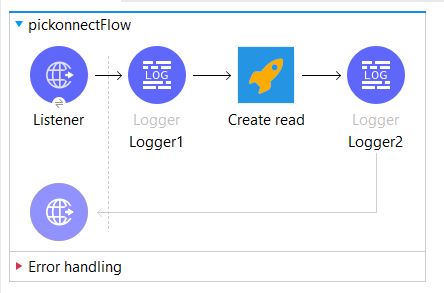
Here is a very simple flow which receives a request to perform a read operation from a basic HTTP listener and passes the request's components to the uRest read connector.
Here are the properties which your request will contain; some are manadatory and others are optional.
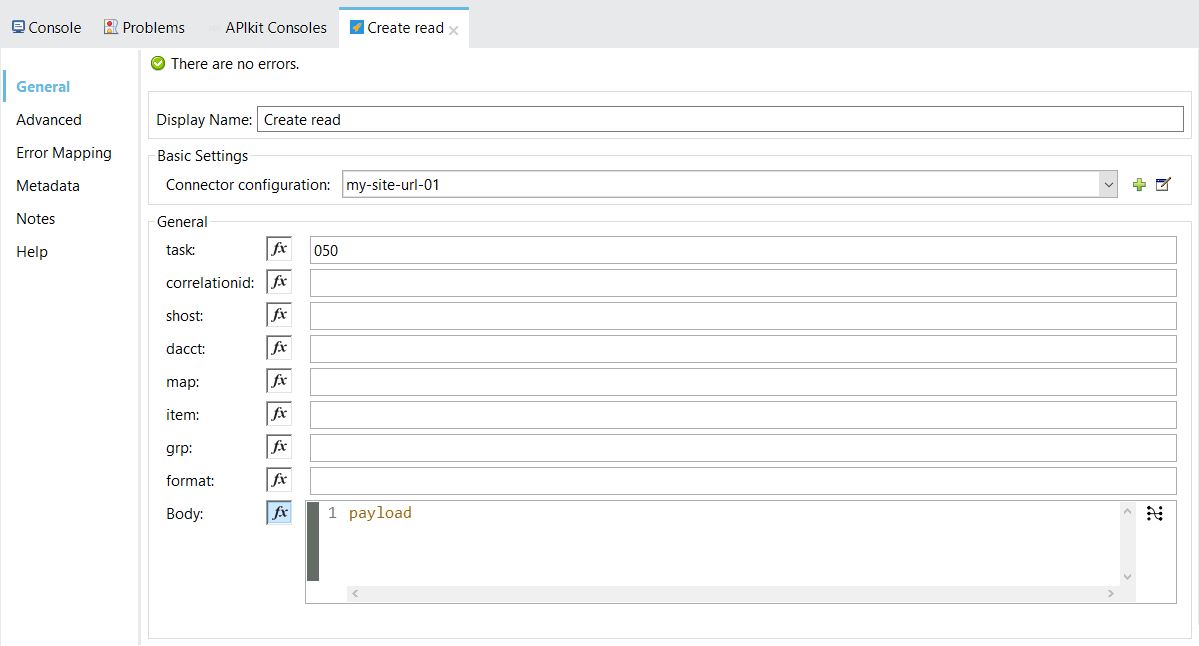
Properties
| Property | Description | Example |
|---|---|---|
| Display Name | Whatever you wish to call this. | Read Operator |
| Basic Settings | Add a connector configuration. This is documented further, below. | |
| task | Always"050" | 050 |
| correlationid | Any unique identifier you provide (such as a GUID). | |
| shost | Optinal: (s - host) the source host definition - used in multi-host environments | {host}.cfg |
| dacct | Optinal: the data account on the source host. | PROD01 |
| map | The map which uRest will use to find the data file. Maps are documented further, below. | prod/customer.map |
| item | The item ID of the record you wish to read. | 100001 |
| grp | Optional: the group of maps and item ID's to read in one operation. This is documented further, below. | |
| format | Optional: the format of the response - JSON or XML only. | json |
connector configuration:
When you build flows within Anypoint, it is likely that you use "http(s)://localhost:nnnn" as your end-point. However, your uRest connectorwill try to connect with the uRest instance. So your connectorwill need to specify your designated uRest end-point.
And where does that come from?
During your evaluation, we ask you to please use "https://api.multivalue.ninja:445/" as this hits our sandbox. Also during evaluation, please be sure to set the x-rfuel-api header of "the-quick-brown-fox-got-decoded", that way the sandpit will know to let you through.
However, when you are ready to develop on actual Pick database customer sites, you need to contact us so we can send you a pro-forma where we work with you to define connectivity and database artefacts. We will work with you every step of the way.
map:
The following sections may seem complex and difficult to grasp at first. We will guide you through this one-on-one, as you progress.
The map holds details of;The source file name
The dsd which defines the data in the file
The template which defines the structure and contents of the response
u2File=XXX   {the name of the file in the VOC.}
list=XXX     {the list of dsd's which describe the file layout - commonly just one dsd.}
template=XXX {the response payload template.}
The list (dsd):
Data Structure Definitions - multi-valued and sub-valued data structures require an accurate definition. Pick customers are usually forced to write data dictionaries to access their data. Frequently, customers find either; an impossible data structure or a lack of experience in writting dictionaries. So, with uRest, we use dsd's to identify individual datum in a Pick record.
As you know, your Pick database holds data in attributes, multi-values and sub-values. To better understand your Pick data, please refer to the documentation provided by the database vendor. Further to database technology, your application vendor will have their file layout specifications. These file layouts are usually in a document outside the system, such as a text file or document.
As such, these file layouts are for your reference and may be covered under an NDA with your vendor. If so, please do not disclose these to UniLibre or Mulesoft.dsd StructureThe dsd must have these columns;
Position Column Name Column Description 1 Tag The tag column allows you to comment out a line or place visual spaces between sections - for your readability 2 Attribute This must be either;an integer, orX-n or n where X is an integer and "n" represents infinity (to the last attribute).E.g. 1 or 2-n or n 3 Multi-value This must be either;an integer, orX-n or n where X is an integer and "n" represents infinity (to the last multi-value).E.g. 1 or 2-n or n 4 Sub-value This must be either;an integer, orX-n or n where X is an integer and "n" represents infinity (to the last sub-value).E.g. 1 or 2-n or n 5 Conv Conversion codes used to make internal values ready for external consumption. See the "Conversion Codes" page for all available codes and how to use them. 6 Column Name The name by which the business refers to this data. Used by non-uRest processes to define column headings for views, so this can be ignored if you wish. 7 Variable Name** The uRest process holds data from the record as described by the dsd and it holds the data in variables for use when building the response. Hence, it is vital that all variable names are unique and it is mandatory that every line in the dsd is given a variable name.
Tip:the dsd is a comma separated valuefile so you must not use a comma in your parameters.
Here is a simple example of a dsd.
,1,,,,Surname,$surname$,
,2,n,,,GivenNames,$givennames$,
,3,1,n,,ResidentialAddress,$resaddress$,
,3,2,,,PostCode,$postcode$,
,3,3,,,CountryCode,$countrycode$,
,4,1,1,,HomePhone,$homephone$,
,4,1,2,,MobilePhone,$mobilenumber$,
,4,2,1,,PreferredPhone,$prefphone$,
,5,2-n,,,OtherEmails,$otheremails$,
,6,1,1,D4,DateOfBirth,$dob$,
,7,,,MD2,AnnualIncome,$annualincome$,
Where;
DSD Line Description ,1,,,,Surname,$surname$, Extract attribute 1, multi-value 1 & sub-value 1 into a variable called $surname$ ,2,n,,,GivenNames,$givennames$, Extract all multi-values in attribute 2 into a variable called $givennames$ ,3,1,n,,ResidentialAddress,$resaddress$, Extract attribute 3 and all sub-values of multi-value 1 into a variable called $resaddress$ ,3,2,,,PostCode,$postcode$, Extract attribute 3, multi-value 2 into a variable called $postcode$ ,3,3,,,CountryCode,$countrycode$, Extract attribute 3, multi-value 3 into a variable called $countrycode$ ,4,1,1,,HomePhone,$homephone$, Extract attribute 4, multi-value 1, sub-value 1 into a variable called $homephone$ ,4,1,2,,MobilePhone,$mobilenumber$, Extract attribute 4, multi-value 1, sub-value 2 into a variable called $mobilenumber$ ,4,2,1,,PreferredPhone,$prefphone$, Extract attribute 4, multi-value 2, sub-value 1 into a variable called $prefphone$ ,5,2-n,,,OtherEmails,$otheremails$, Extract all multi-values in attribute 5 starting from multi-value 2 into a variable called $otheremails$ ,6,1,1,D4,DateOfBirth,$dob$, Extract attribute 6, multi-value 1, sub-value 1 into a variable called $dob$ ,7,,,MD2,AnnualIncome,$annualincome$, Extract attribute 7 into a variable called $annualincome$
The template:
uRest will require a template to structure the data that is to be returned. Hence, the template is simply a text document describing the format you require.
The variable names used in the dsd are matched to variable names found in the template. uRest substitutes variable names with data during the process of compiling the reply.
Within a template if you have multiple variables on a single line, the values will be grouped together.
Pick data is multi-valued and even sub-valued within, so your templates may need to cater for repeating blocks of data. This can be achieved by using a %import% {sub-template name} where you handle the repeating blocks.
Template Examples
XML
BankDetails1.txt
```
<?xml version="1.0"?>$BSB$ $BankName$ $BranchLocation$ $BranchPostcode
rFuel Connector - Mule 4 ``JSON
BankDetails2.txt
{ "BSBtest": { "bsb": "$BSB__COMPONENT_PLACEHOLDER__quot;, "bank": "$BankName__COMPONENT_PLACEHOLDER__quot;, "branch": "$BranchLocation__COMPONENT_PLACEHOLDER__quot;, "Postcode": "$BranchPostcode__COMPONENT_PLACEHOLDER__quot; } }grp:
"grp" reads are an advanced feature. We'll send you the details on using these when you're ready to start building production-grade applications.Write Instruction
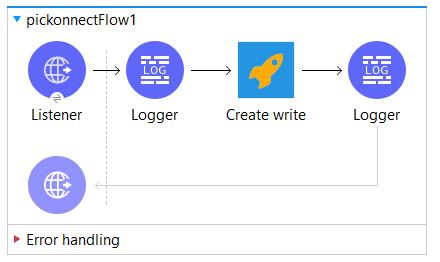
Here is a very simple flow which receives a request to perform a write operation from a basic HTTP listener and passes the request's components to the uRest write connector.
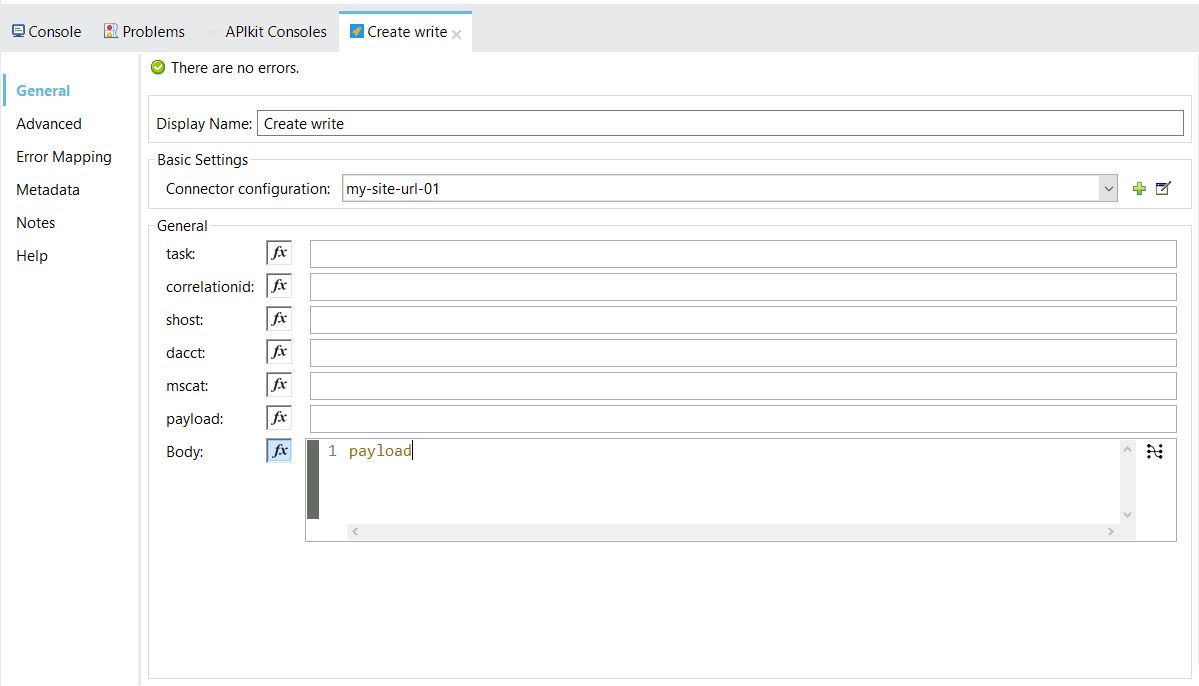
Here are the properties which your request will contain; some are manadatory and others are optional.
Properties
Property Description Example Display Name Whatever you wish to call this. Read Operator Basic Settings Use the same connector configuration as defined for read operations. task Always"055" 055 correlationid Any unique identifier you provide (such as a GUID). mscat The mscat identifies the microservice catalogue item which uRest will use to ingest your inbound payload. This is documented further, below. payload The payload is the entire inbound data stream which needs to be written to the database. Examples are shown below. shost Optinal: (s - host) the source host definition - used in multi-host environments {host}.cfg dacct Optinal: the data account on the source host. PROD01 the mscat:
uRest is instruction-driven and not programmatic. So all write instructions pass through the same processes. For this reasaon, write operations must be configured (instructed) to perform your goal, this configuration is performed in two places;In the mscatalog folder of uRest as a ".msv" file and
In the uCATALOG file in the source host (pre-built for for)
Microservice catalogs (mscat) are configuration files which define the actions uRest will take on the payload supplied in your request. Each catalog definition has a specific structre which is described here;
tag RetVal xPath DBMap Varname uCatalog Comments
Field Description tag Place a “#” in the first field to render it as a comment line RetVal Optional: Place a “Y” in this column against the (singular) variable that you may wish to be returned by the process. xPath The full xPath String notation of each element of the payload, including the root element. Standard xPath Notation is in the form of A/B/C. For readability, uRest denotes an xPath in this form; A.B.C. Effectively, the same outcome is achieved. Use this notation to map an xPath value(s) to a U2 file and record. DBMap This column contains the critical information which tells uRest which file, attribute, multi-value and sub-value this data will be placed in.
Usage:{file name}_{atr}_{mv}_{sv}_{conv}
Where:underscore is used to separate the elements.{file name} is the name of the U2 file as defined in the VOC .{atr} the attribute number in the record to place the data in.{mv} the multi-value number in the record to place the data in.{sv} the sub-value number in the record to place the data in.{conv} the INPUT conversion to process the data through.For {atr}, {mv} and {sv}, it is possible to use a variable name to define the attribute, multi-value or sub-value. uRest will use the contents of the variable name in assigning data to that record location.
Valid INPUT conversions are those defined on the Conversions page.
Payloads with more than one target U2 file defined are handled within uRest. These multi-update payloads are sent, with no extra handling to the back-end microservice which loads data.Varname uRest manages the inter-relationships between inbound data and database records. It does so by creating handles between the xPath and the record, these handles are the variable names you assign to each relationship. Hence, do not reuse a variable name. You must have a variable name for each item that has an xpath or is intended to be returned. uCatalog This is the back-end, database implementation of the mscat item. The implementation is in the structure described here;Usage: {catalog type}-{thread flag}-{mscat name} {variable} {variable}Example:ucat-x-uLoadRecord @VPOOL @MPOOL @DPOOLWhere:{catalog type} is one of the following options;subr : this microservice will call a subroutine in the U2 hostexec : this will execute a program, sentence or paragraph on the databaseucat : this is a catalogued program on the U2 host.{thread flag} a flag to signify the thread-ability of the task. It can be;x - run in the current process (strongly recommended)t - run as a thread process. NB: The intention here is to enable "threading" (phantoms) of unrelated uCatalogs within one mscat item, to also enable a wait state (x) if required, then to thread the next set of unrelated tasks, and so on. This is designed for ONE mscat with many uCatalog definitions and in a true microservice architecture, this is extremely rare.{mscat name} is the item which will be found in either;The mscatalog subdirectory, orThe uCATALOG file in the U2 account. In this case ‘uLoadRecord’{variable} is the unique handle you give to the relationshipComments Optional: uRest ignores everything in this column. the payload:
Here is an example uRest request with a payload;
{
  "request": {
    "TASK": "055",
    "MSCAT": "CreateTestRecord.msv",
    "FORMAT": "json",
    "CORRELATIONID": "Create-Record",
    "PAYLOAD": "{\"InBound\":{\"BaseData\":{\"ID\":\"3\",\"Company\":\"Unilbre\",\"StaffID\":\"1@VM@2\",\"Name\":\"Consultant1@VM@Consultant2\",\"Contact\":\"0400112233@SM@consultant1@unilibre.com.au@VM@0433221100\",\"ContactType\":\"mobile@SM@email@VM@mobile\",\"Location\":\"Brisbane@VM@Perth\",\"State\":\"QLD@VM@WA\"}}}"
  }
}
Conversion Codes
Pick databases holds data in an internal format which is not readily consumable by external processes. rFuel Conversion Codes enable native and extended transformations to make the data consumable.
Pick databases do not "type" data the same way other relational databases do, such as; bigint, int, varchar(), etc. So it becomes our responsibility to define the output conversions that the Pick data must be put through to be SQL data-type compliant. For example, a conversion rule of “D4” will turn 16954 as found in the Pick record into “01 JUN 2014”.
Numbers - MDx[options]
Decimal & integer conversions take the general form MDx[options].
This table uses MD2 to illustrate the behavior of the conversion but the number “2” can be any number between 0-9, where;
- "MD" signifies the standard Masked Decimal
- “x” is an integer between 0-9 inclusive
- [options] shown below are consistent for all “x” values
Conv Internal External Description MD0 1234567 1234567 Convert to 0 decimal places MD2 1234567 12345.67 Convert to 2 decimal places MD2 abc abc No effect on alpha characters MD2~ 1234567 12,345.67 Convert to 2 decimals with commas.
NB: Use “~” in the conversion NOT “,”MD2~ empty empty No effect on alpha characters.
NB: Use “~” in the conversion NOT “,”MD2~$ 1234567 $12,345.67 Convert to 2 decimals with commas and $ symbol MD2~$ -1234567 -$12,345.67 Convert to 2 decimals with commas and $ symbol Dates - Dx[options]
Date conversions take the general form Dx[options].
This table uses
D4to illustrate the behavior butD2behaves the same.Where:
- D signifies the standard Date conversion
- “x” is either “2” or “4”
- [options] shown below are consistent for all values of “x”
Example date “30 JUN 2010” is stored internally as “15522”
Conv Internal External Description D2 15522 30 Jun 10 dd mmm yy D4 15522 30 Jun 2010 dd mmm yyyy D4- 15522 30-06-2010 (Recommended) D4-YMD 15522 2010-06-30 yyyy-mm-dd D4/ 15522 30/06/2010 mm/dd/yyyy Time - MT[options]
Pick databases hold time as the number of seconds past mid-night. To transform the number into a time format, the database offers Masked Time transformations.
Conv Internal External Description MT 7200 02:00 hh:mm MT 54000 15:00 hh:mm MTH 54000 03:00pm hh:mm {am,pm} MTH 7200 02:00am hh:mm {am,pm} MTS 7200 02:00:00 hh:mm:ss (Recommended) MTHS 7200 02:00:00am hh:mm {am,pm} MT. 54700 15.11 hh.mm Text
Text is usually stored in Pick databases as upper-case and the database provides native transformations for those who wish to transform text to be more readable.
Conv Internal External Description MCU Your Name YOUR NAME Convert all lowercase to uppercase letters. MCL Your Name your name Convert all uppercase to lower case letters. MCT your name Your Name Convert to camel case. MCA George6800 George Retrieve all alphabetic characters from the string. MCN George6800 6800 Retrieve all numeric data from the string. String Extraction
It is common to find strings in records which are delimited, for example ABC. Pick databases offer native string manipulations (group extraction) to obtain each of the string elements.
Sometimes data will be delimited by a character to separate its elements. For example, sometimes a field will have an “*” separating parts of the field. You can access each of the components of the field using String Extraction as shown in the examples below. As above a tilde should be used instead of a comma.
Raw Data Conv Code Result 1111*2222,3333@4444 F*1 1111 1111*2222,3333@4444 F*2 2222,3333@4444 1111*2222,3333@4444 F*2}F~1 2222 1111*2222,3333@4444 F*2}F~2}F@1 3333 1111*2222,3333@4444 F*2}F~2}F@2 4444 A B
(space between A and B)F 1
(space between F and 1)A 123456S13 FS1 123456 123456S13 FS2 13 NB: as you can see, it is possible to perform more than one conversion operation on a piece of data and this is achieved by separating the conversion by a "}" character.
Next Steps
Install the uRest connector and begin to experiment with it. We provide you with sample artefacts and data to accelerate through this phase. Contact us to begin this journey, it is not a sales exercise but rather an exploration of what you can achieve with this Mulesoft connector.
Once you are comfortable with the entire api-led SDLC and you are ready to build integration services, let us know so we can deploy your own uRest instance and connect your database, then help you build your own artefacts.
| Type | Connector |
|---|---|
| Organization | MuleSoft |
| Published by | MuleSoft Partner |
| Published on | Apr 26, 2023 |
Asset versions for 1.0.x
| Version | Actions |
|---|---|
| 1.0.0 |