Local API
Endpoints
HTTP Integration
Introduction
The Market Pay Local API uses a mixed communication model based on the endpoint's requirements:
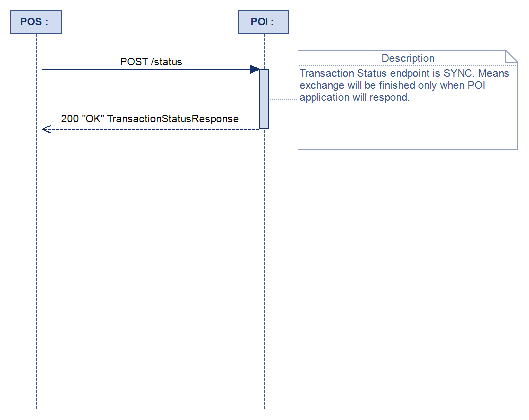
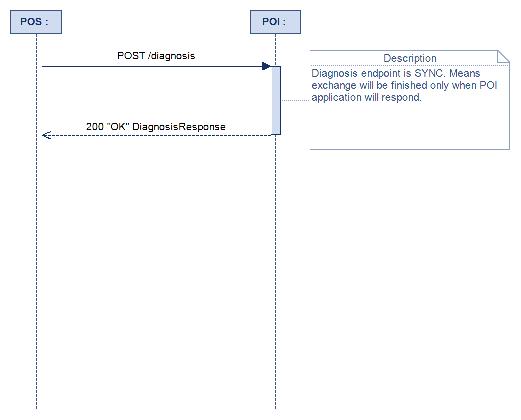
- Synchronous (SYNC) Mode: Used for simple, direct actions where the POS waits for an immediate result. This follows a standard single request/response cycle (e.g., POST /status returns RC 200 OK with the response body).
- Asynchronous (ASYNC) Mode: Used for complex transactions that require user interaction or processing time. This involves the HTTP Polling cycle detailed below.
1. Endpoints
- POST: Used in ASYNC/SYNC modes
- GET: Only used to fetch stored responses
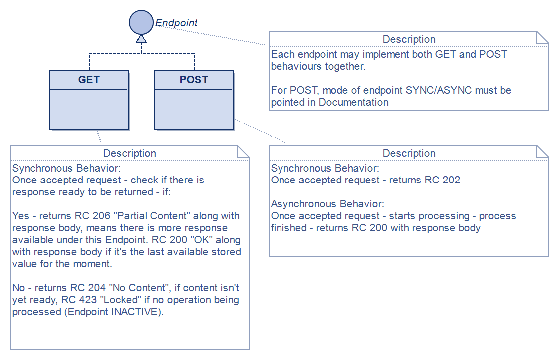
2.1 Pay On Site Endpoint description list
| N | Name | Function | Mode | Input Message | Output Message |
|---|---|---|---|---|---|
| 1 | /login | POST | SYNC | LoginRequest | LoginResponse, EventNotification, RC 408, RC 500 |
| 2 | /payment | POST | ASYNC | PaymentRequest | RC 202, RC 403 |
| 2 | /payment | GET | SYNC | Nothing | RC 200, RC 204, RC 206, RC 423, RC 408, RC 500, DisplayRequest, EventNotification, PaymentResponse |
| 3 | /abort | POST | SYNC | AbortRequest, AdminRequest | RC 202 |
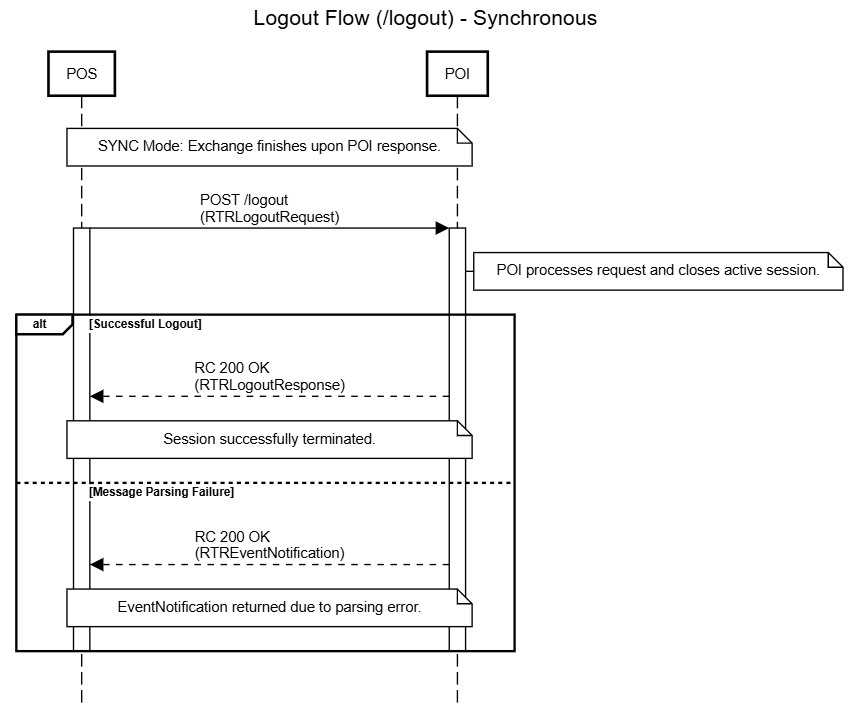
| 4 | /logout | POST | SYNC | LogoutRequest | LogoutResponse, EventNotification |
| 5 | /acquisition | POST | ASYNC | CardAcquisitionRequest | RC 202, RC 403 |
| 5 | /acquisition | GET | SYNC | Nothing | RC 200, RC 201, RC 204, RC 206, RC 423, RC 408, RC 500, DisplayRequest, CardAcquisitionResponse, EventNotification, AdminResponse |
| 6 | /status | POST | SYNC | TransactionStatusRequest | RC 200, RC 408, RC 500, TransactionStatusResponse, EventNotification |
| 7 | /diagnosis | POST | SYNC | DiagnosisRequest | RC 200, RC 408, RC 500 DiagnosisResponse, EventNotification |
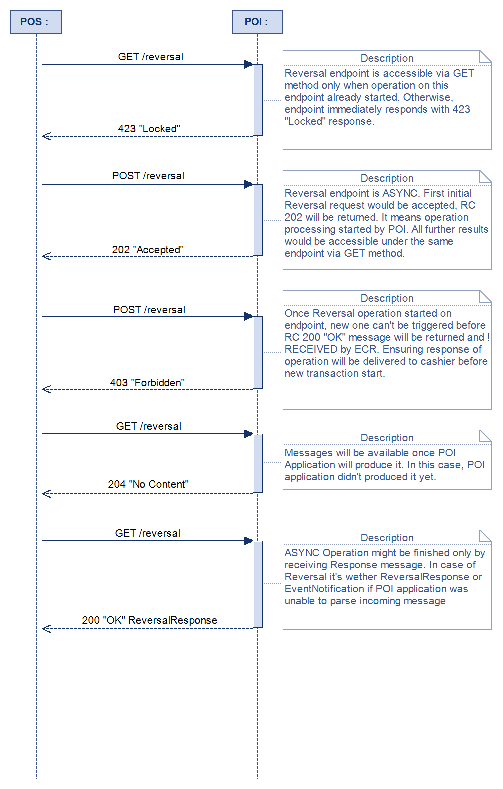
| 8 | /reversal | POST | ASYNC | ReversalRequest | RC 202, RC 403 |
| 8 | /reversal | GET | SYNC | Nothing | RC 200, RC 204, RC 408, RC 423, RC 500, ReversalResponse, DisplayRequest, EventNotification |
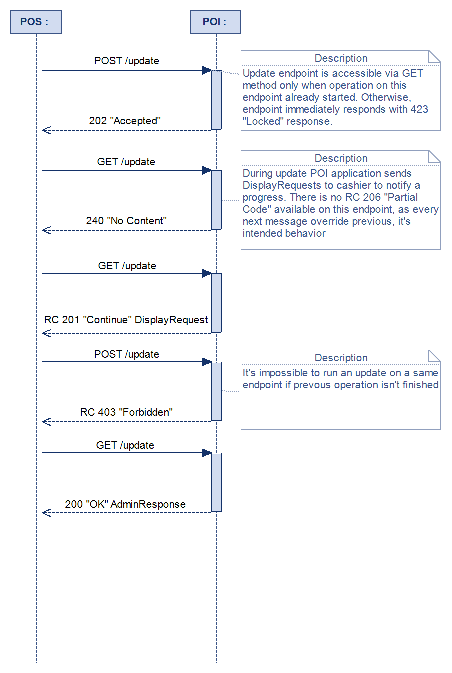
| 9 | /update | POST | ASYNC | AdminRequest | RC 202, RC 403 |
| 9 | /update | GET | SYNC | Nothing | RC 200, RC 201, RC 204, RC 206, RC 423, RC 408, RC 500, DisplayRequest, EventNotification, AdminResponse |
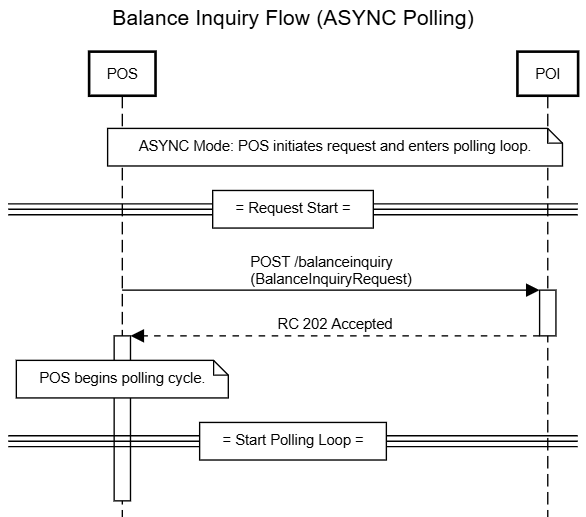
| 10 | /balanceinquiry | POST | ASYNC | BalanceInquiryRequest | RC 202, RC 403 |
| 10 | /balanceinquiry | GET | SYNC | Nothing | RC 200, RC 201, RC 204, RC 206, RC 423, RC 408, RC 500, DisplayRequest, EventNotification, BalanceInquiryResponse |
| 11 | /giftcard | POST | ASYNC | StoredValueRequest | RC 202, RC 403 |
| 11 | /giftcard | GET | SYNC | Nothing | RC 200, RC 204, RC 423, RC 408, RC 500, EventNotification, StoredValueResponse |
| 12 | /activation | POST | ASYNC | AdminRequest | RC 202, RC 403 |
| 12 | /activation | GET | SYNC | Nothing | RC 200, RC 201, RC 204, RC 206, RC 423, RC 408, RC 500, DisplayRequest, EventNotification, AdminResponse |
| 13 | /reconciliation | POST | ASYNC | ReconciliationRequest | RC 202, RC 403 |
| 13 | /reconciliation | GET | SYNC | Nothing | RC 200, RC 204, RC 423, RC 408, RC 500, ReconciliationResponse, EventNotification |
| 14 | /acquisition/abort | POST | SYNC | AdminRequest | RC 200, RC 408, RC 500, AdminResponse, EventNotification |
2.2 Voucher Endpoint description list
| N | Name | Function | Mode | Input Message | Output Message |
|---|---|---|---|---|---|
| 1 | /italy/voucher/payment | POST | SYNC | PaymentRequest | RC 200, RC 408, RC 500, PaymentResponse |
| 2 | /italy/voucher/reversal | POST | SYNC | ReversalRequest | RC 200, RC 408, RC 500, ReversalResponse |
| 3 | /italy/altpayment/payment | POST | SYNC | PaymentRequest | RC 200, RC 408, RC 500, PaymentResponse |
| 4 | /italy/altpayment/reversal | POST | SYNC | ReversalRequest | RC 200, RC 408, RC 500, ReversalResponse |
2.3 Cheque Endpoint description list
| N | Name | Function | Mode | Input Message | Output Message |
|---|---|---|---|---|---|
| 1 | /cheque/payment | POST | SYNC | PaymentRequest | RC 200, RC 408, RC 500, PaymentResponse |
| 2 | /cheque/reversal | POST | SYNC | ReversalRequest | RC 200, RC 408, RC 500, ReversalResponse |
3. Transaction Status Codes
3.1 Flow Reference
This table defines the meaning and required actions for every HTTP response code encountered during
a synchronous transaction or the asynchronous polling loop.
| RC | Status & Type | Content Delivered | Flow Result | ||
|---|---|---|---|---|---|
| 200 | OK (Final) | Full Body (PaymentResponse) or Failure Body (EventNotification). | Transaction Finalized. The final result has been received. POS must STOP polling and finalize the transaction based on the content (success/failure). | ||
| 202 | Accepted (Start) | None (Empty Body) | Transaction Started. The request was accepted and queued. The POS must immediately BEGIN polling (GET loop). | ||
| 423 | Locked (No Operation) | None (Empty Body) | No Current Operation. Response Code returned when server doesn't process any operations on this endpoint hence no response available, no need to poll GET requests. | ||
| 403 | Forbidden (Critical Error) | None (Empty Body) | Rejected. It informs that there is an operation in progress and not possible to start next one. The request is not allowed (e.g., already in progress). The POS must STOP the transaction immediately. And get result of previous via GET method | ||
| 408 | Request Timeout | None (Empty Body) | Timeout. The request wasn't handled by POI within configured timeout | ||
| 500 | Internal Server Error | None (Empty Body) | Unexpected error An Unexpected Exception occurred during request or response handling |
3.2 ASYNC Polling Intermediate Codes
These codes are exclusively returned to a GET polling request and require the POS application to continue the monitoring loop until a final status (RC 200/423) is reached.
In ASYNC, POS will receive Display Request sent by the POI via the polling cycle. Its primary function is to instruct the POS on what information to display or what operational status has been reached during a transaction.
| RC | Status & Type | Content Delivered | Flow Result |
|---|---|---|---|
| 201 | Created | Body (DisplayRequest) | Customer Action Required. The POI needs the customer to interact (e.g., PIN entry, card selection). POS must display the message and continue polling. |
| 206 | Partial Content | Body (DisplayRequest or EventNotification) | Status Update. Provides intermediate status data. POS must handle the notification and continue polling. |
| 204 | No Content | None (Empty Body) | Processing. The transaction is active, but the POI has no status updates ready yet. POS must continue polling (checking again later). |
3.3 Polling loop
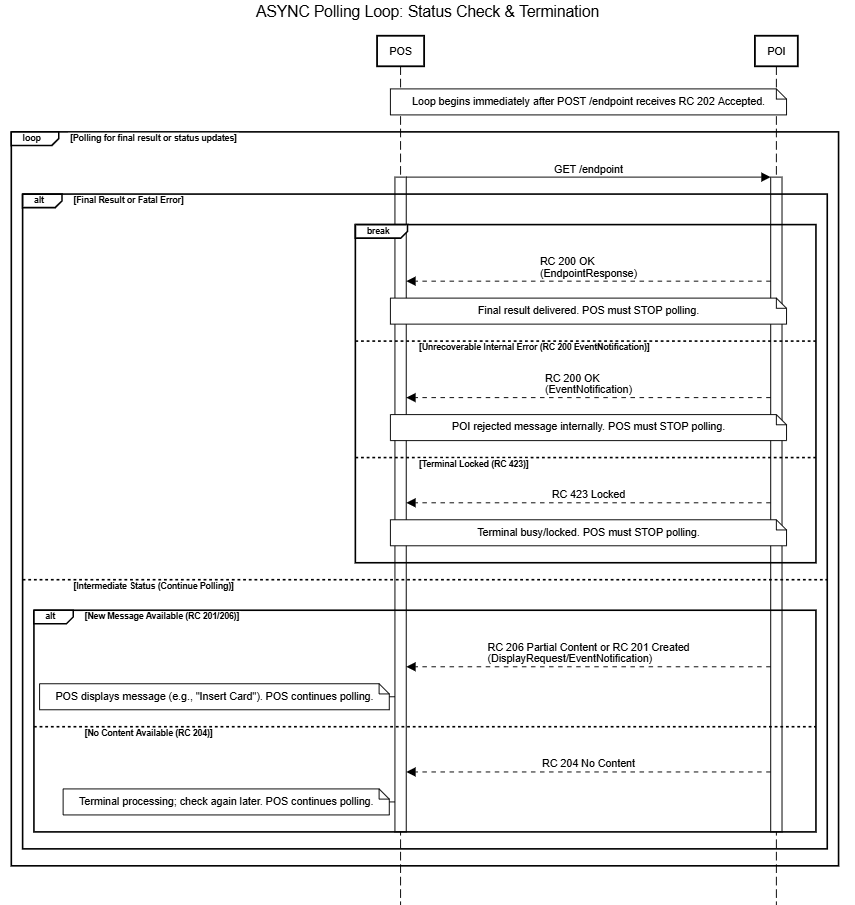
The Polling Loop is the mechanism used for Asynchronous (ASYNC) transactions, where the Point of Sale (POS) actively monitors the Payment Terminal (POI) for a final result after initiating a request. This loop replaces a persistent connection and is critical for managing transaction state and communication stability.
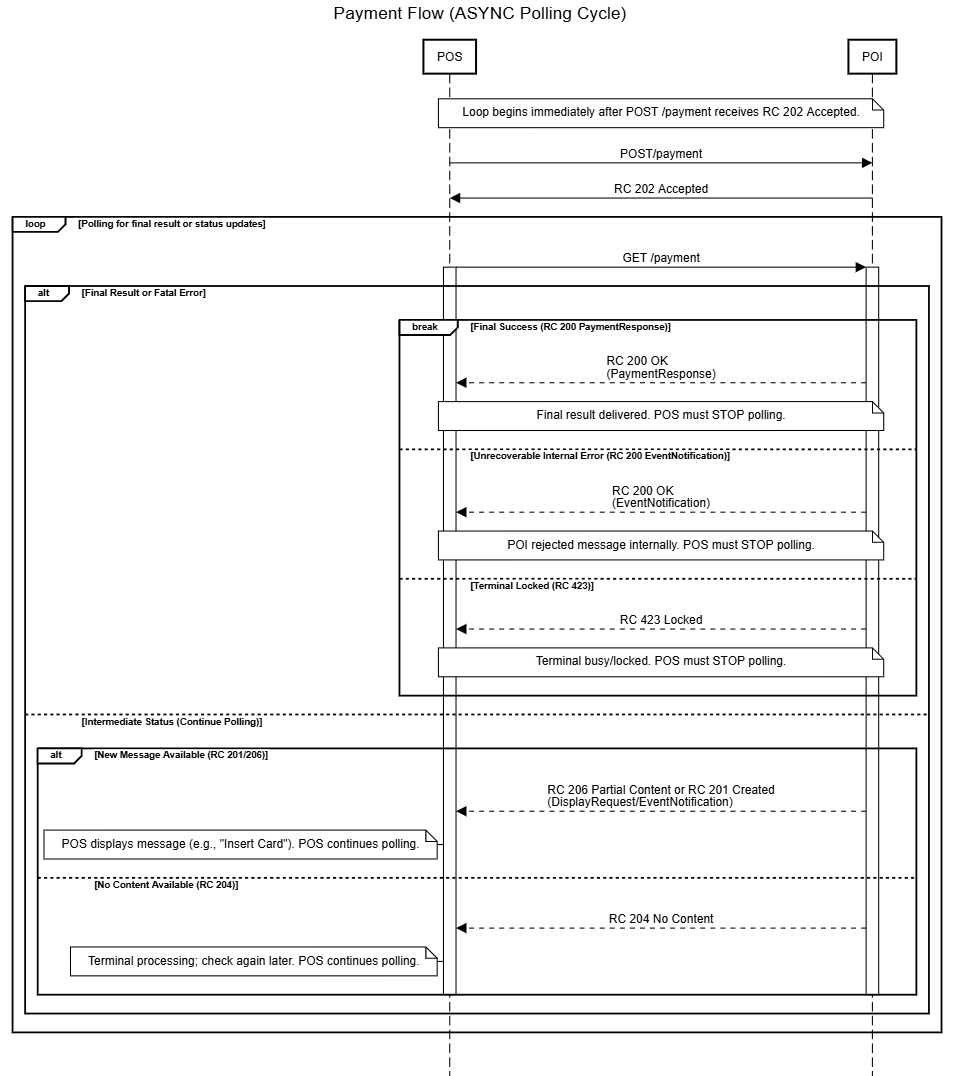
- Initiation: The POS sends a POST request (e.g., /payment) and receives RC 202 Accepted, signaling the transaction is queued and the loop must begin.
- Continuation: The POS sends repeated GET requests (polling). The loop continues as long as the POI returns an intermediate status (RC 206 Partial Content, RC 201 Created, or RC 204 No Content).
- Termination (Success/Failure): The loop immediately stops (break) when the POI returns a final status code (RC 200 OK for the result or RC 423 Locked/RC 403 Forbidden for a fatal error).
- Exception: An unrecoverable internal error (like a parsing rejection) is delivered via an RC 200 OK response containing an EventNotification, which also requires the POS to immediately stop polling.
###
4. Pay On Site Flows
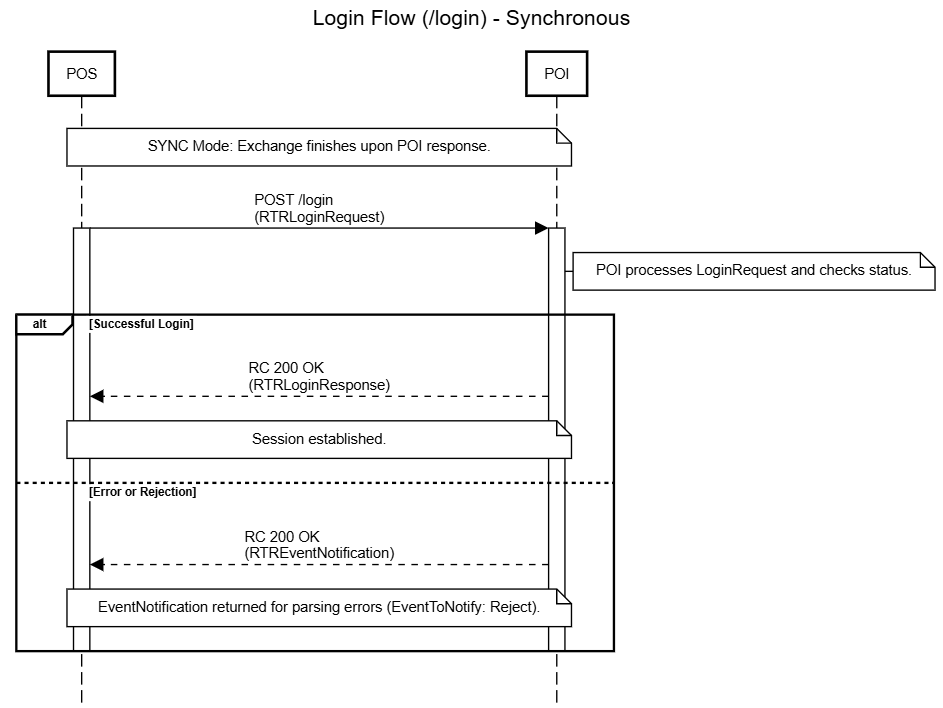
4.1. Login flow
3.2. Payment Flow
3.3. Abort
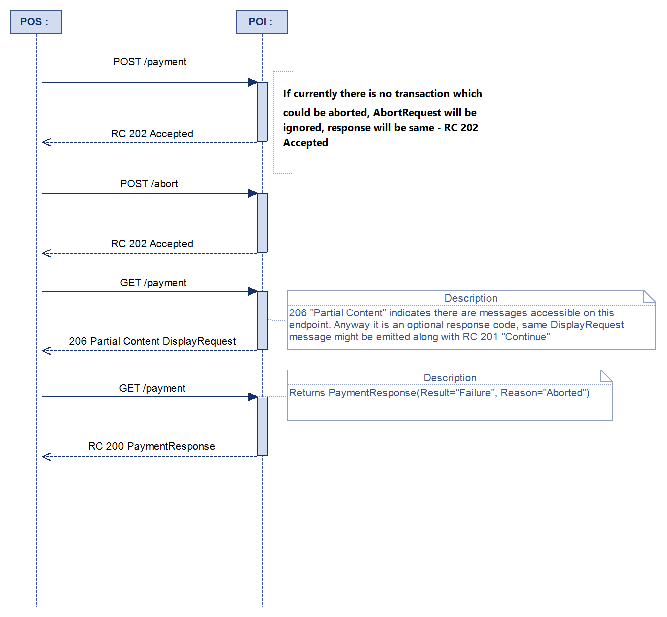
In this case payment response’s Field “Result”: “Error”, “Reason”: “Aborted”
3.4. Logout
3.5. Acquisition
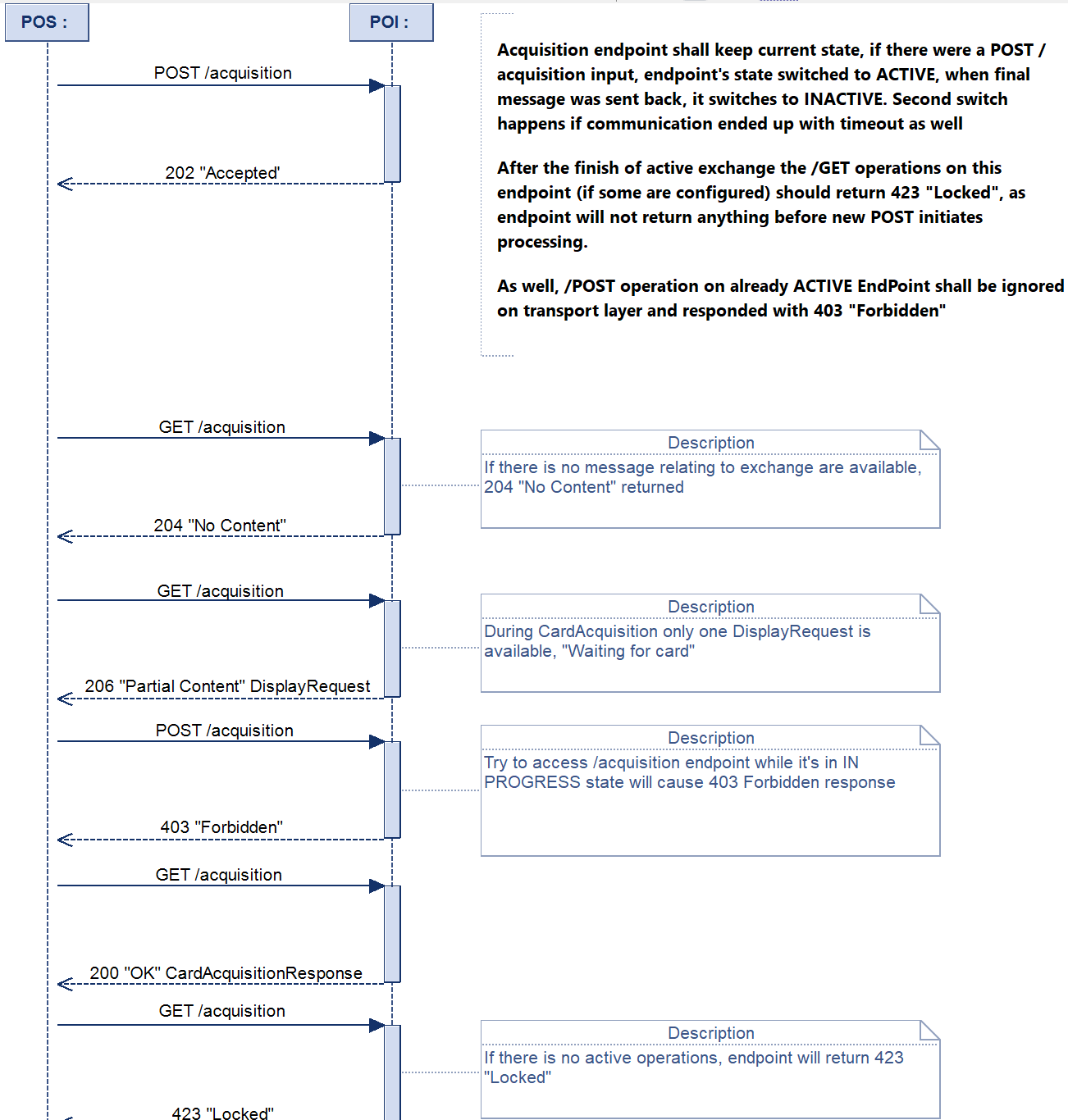
INFO: Display request may be returned with code 206 Partial Content or 201 Continue
Continue - in case when there is currently no cached responses available on endpoint except this Display
Card Acquisition is a first part of “Dual” transaction, to Authorise transaction, further PaymentRequest should be sent (/payment Endpoint). Request shall contain CardAcquisitionReferenceId field pointing POITransactionId field from received previously CardAcqusitionResponse
3.6. Status
3.7. Diagnosis
3.8 Reversal
3.9 Update
3.10 Balance Inquiry
3.11 Gift Card
- No diagram available
Italy endpoint
1. Voucher Payment
- No diagram available
2. Voucher Reversal
- No diagram available
3. Alternative Payment
- No diagram available
4. Alternative Reversal
- No diagram available
Cheque endpoint
1. Cheque payment
- No diagram available
2. Cheque reversal
- No diagram available
##