Infusion And Processing APIs
Infusion-Processing API
The API provides information about the Infusion-Processing details from the ICS account.
Introduction
The Infusion-Processing API allows to fetch/initiate details from ICS account. Infusion-Processing AP is secured by OAuth token validation, allowing customer to access specific or all records depending on the API use case:
- Fetch all Infusion-Processing details.
- Start/complete Infusion record.
- Start/complete Processing record.
Overview
The Infusion-Processing API is a REST-based solution that securely process the Infusion-Processing data to the ICS system.
It is secured by OAuth 2.0 and has below endpoints
/Ping: This endpoint returns API health.
This endpoint consists of GET method, which gives the health status of the API.
/Infusion:
/start : This endpoint consists POST methods to create new batch with record type infusion batch. It reserves the package quantity used during this process.
/complete: This endpoint consists PUT methods to update the infusion batch to record type infused batch. It creates new packages based in the input payload.
/processing:
/start : This endpoint consists POST methods to create new batch with record type processing batch. It reserves the package quantity used during this process.
/complete: This endpoint consists PUT methods to update the processing batch to record type processed batch. It creates new packages based in the input payload and product.
GET: This method returns Infusion-Processing details by using below query parameters.
1. sourceSystem: It is mandatory parameter for specific facility.
2. icsBatchId: Batch name generated by ICS system, it is non mandatory parameter.
3. sourceSystemBatchId: Source System batch id, it is non mandatory parameter.
4. pageNumber: It is an optional field used for querying the Infusion-Processing details with specific page number.
Validations
Start Infusion:
1. Assembly should be available within the ICS account.
2. The Package should have remaining quantity greater than 0.
3. Package pre-pack item and lab request flag should be false
4. Batch on hold or Recalled flag should be false
5. Cannot infuse untested Bulk Concentrate package into a Cannabis Derived Product.
6. Equipments used should be registered under the ICS account.
Complete Infusion:
1. Valid infusion batch should be used.
2. Equipments and ingredients used should be registered under the ICS account.
3. Package used should be valid.
Start Processing:
1. processingType should be available within the ICS account.
2. The Package should have remaining quantity greater than 0.
3. Package pre-pack item and lab request flag should be false
4. Batch on hold or Recalled flag should be false
5. Cannot process untested Bulk Concentrate package.
6. Equipments used should be registered under the ICS account.
Complete Infusion:
1. Valid processing batch should be used.
2. Equipments and ingredients used should be registered under the ICS account.
3. Package used should be valid.
Key features and benefits
The following are features and benefits of the Infusion-Processing AP:
1. Provides access to account details including token validation.
2. Puts your customers in control of their data sharing permissions and grants through our Security.
How it works
The following diagram illustrates how the Infusion-Processing AP works.
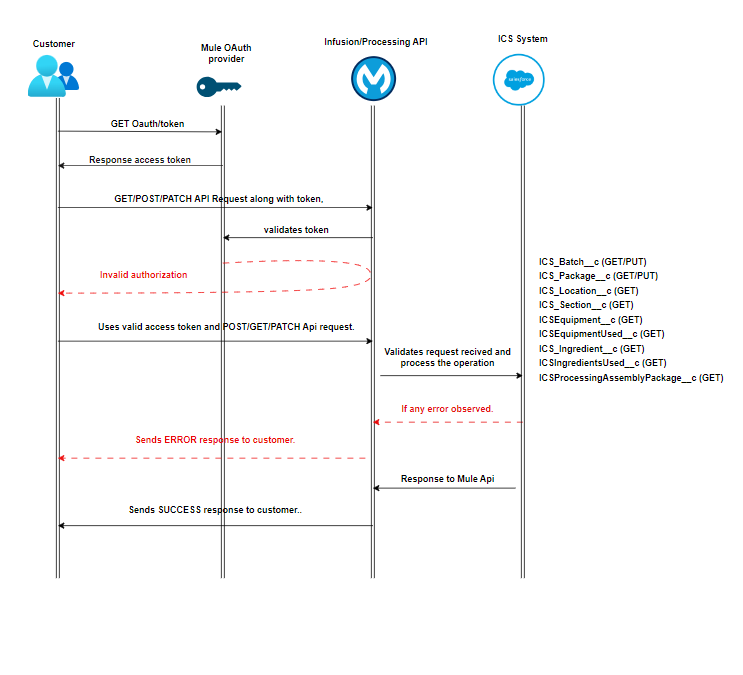
- The customer sends client ID and Secret requesting authorization token from Mule OAuth provider API.
- Send the security token with valid JSON request to Infusion-Processing endpoint.
- If the access is successful, API will perform the operations and create/update/get the records to/from ICS.
- Response from ICS is captured and return to source system.
- If any error in the flow or validation error, Mule API handles and reverts the specific error with the customer along with standard error codes.