Sales Order API
Sales Order API
This API is used for creating sales orders for partner facilities as well as patient sales orders.
Introduction
The Sales Order API allows to create/update/get details from ICS account. API is secured by OAuth authentication, allowing customer to access records for specific facility depending on the API use case:
- Fetch Sales Order details.
- Create Sales Order for partner facilities or for patient sale.
- Update Sales Order.
Overview
The Sales Order API has below endpoints,
/ping:
This endpoint consists of GET method, which gives the health status of the API.
/SalesOrder:
This endpoint consists of GET, PUT methods, these are used to fetch, create/update the Sales Orders in ICS system.
GET: This method returns Sales Order details by using below query parameters.
- sourceSystem: It is mandatory parameter used for querying the SalesOrder details.
- sourceSystemSalesOrderId: This is an external (source) salesOrder Ids used for querying the SalesOrder details.
- icsSalesOrderId: This is the ICS sales order id (name) generated by the ICS system. This is an optional field.
- pageNumber: It is an optional field used for querying the SalesOrder details with specific page number. If your records are beyond 2000, use date query parameters.
- toDate & fromDate: These are optional parameters to extract sales order based on specific creattion date range in ICS system.
PUT: This method creates/updates SalesOrder details in ICS system.
- Sales order can be created for B2B when partnerFacility value is passed in request.
- API allows order with icsPackageId or itemProduct for B2B.
- Sales order for B2C i.e. sales to patient is created when patientNumber or caregiverNumber is passed in the request.
Key features and benefits
The following are features and benefits of the Sales Order API:
- Provides access to Sales Order data based on client id and source system code.
- Puts customers in control of their data sharing permissions and grants through API Security.
- Data validation is performed while modifying orders.
- No PII or secure information is logged during transaction.
How it works
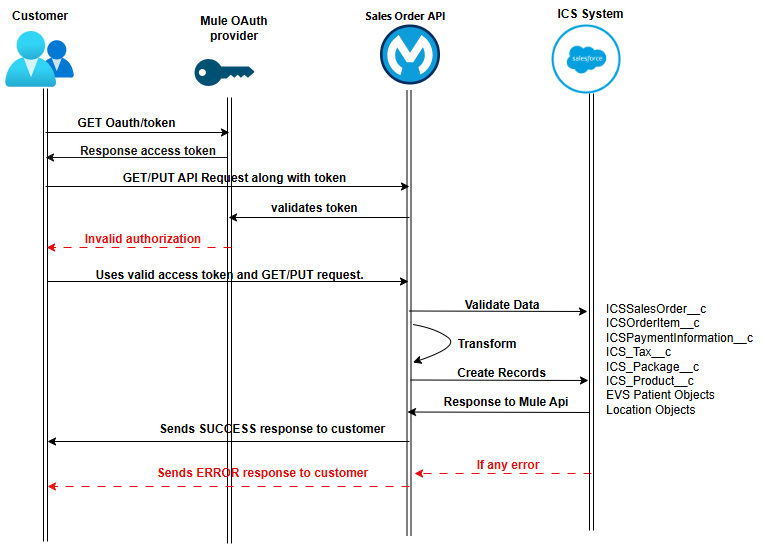
The following diagram illustrates how the Sales Order API works.
- The customer sends client ID and Secret requesting authorization token from Mule OAuth provider API.
- Send the security token with valid JSON request to Sales Order endpoint.
- If the access is successful, API will perform the operations and create/update/get the records to/from ICS.
- Response from ICS is captured and return to source system.
- If any error in the flow or validation error, Mule API handles and reverts the specific error with the customer along with standard error codes.
Validations
The following are the validations for data transformation in Sales Orders API.
- sourceSystem and sourceSystemSalesOrderId are mandatory parameters while SO creation.
- sourceSystemSalesOrderId is the combinations of sourceSystem+ "-" + sourceSystemSalesOrderId while stored in ICS System.
- order Items is mandatory in Sales order and payment Information is optional.
- icsPackageId is mandatory for pharmacy sales order and it is optional for cultivators and processors. i.e. B2B sales
- Cultivators/processors can either pass icsPackageId or itemProduct values in order item.
- Patient/Caregiver number or partnerFacility either of one is mandatoty field while creating sales order.
- For pharmacy and patient transfer, package must have packageSize and valid test result while creating Sales Order
- Partial Sales are allowed for pharmacy to patients but not for facility to facility (B2B) sales.
- If package is used at order item level, package quantity is reserved while order status is in progress. It gets reduce to zero after receive transfer is complete.
- Order item quantity and package remaining quantity should be less than or equal while creating the order.
- Order Item quantity cannot be more than package quantity if icsPackageId is used while SO creation.
- Tax information is optional for all facilities, however valid tax name along with either tax rate or tax amount to be passed in input.
- Payment information is optional segment while creating sales orders.
- Location information such as Building and room is mandatory at order item level.
- Transfer fee will be set to default value in ICS system.
- Sales order update is allowed before it is approved
- For B2B, Sales order get approved automatically via Purchase Order creation. No updates allowed once Sales order is approved
- For B2B, consumer facility can see sales order details once associated transfer is in "Ready for Review" status.
Assumptions
The following message handling is expected by API from API consumers,
- While adding multiple orderItems for same package or product, accumulate the records in single orderItem object by adjusting quantity before passing to API.
- API consumer will pass valid token, valid JSON payload while invoking this API.
- Use toDate and fromDate parameters while extracting high volume data from ICS instead of using pagination over 100 pages.
- The API will not perform validation of the payment information. Responsibility for submitting the required payment information for compliance rests with the industry.
Use Cases
The following use cases are supported by the Sales Order API.
| Use Case | Endpoint | Method | Description | Required Inputs | Key Validations |
|---|---|---|---|---|---|
| API Health Check | /ping | GET | Verifies API availability and health status. | None | Returns API health status response. |
| Retrieve Sales Order Details | /SalesOrder | GET | Retrieves Sales Order records from ICS using query parameters. | sourceSystem | sourceSystem is mandatory. Optional filters include sourceSystemSalesOrderId, icsSalesOrderId, pageNumber, fromDate, and toDate. |
| Create B2B Sales Order | /SalesOrder | PUT | Creates a Sales Order for partner facilities. | sourceSystem, sourceSystemSalesOrderId, partnerFacility, orderItems | partnerFacility is mandatory for B2B sales. Order Items are required. Cultivators/processors can provide either icsPackageId or itemProduct. |
| Create B2C Sales Order (Patient Sale) | /SalesOrder | PUT | Creates a Sales Order for a patient or caregiver. | sourceSystem, sourceSystemSalesOrderId, patientNumber or caregiverNumber, orderItems | Either patientNumber or caregiverNumber must be provided. Pharmacy orders require a valid icsPackageId. |
| Update/Cancel Sales Order | /SalesOrder | PUT | Updates an existing Sales Order in ICS. | Existing Sales Order identifier | Updates/cancel are allowed only before the Sales Order is approved. |
| Sales Order with Tax Information | /SalesOrder | PUT | Creates a Sales Order with tax details at orderItems level. | Tax information (optional) | Valid tax name and either tax rate or tax amount must be supplied when tax details are provided. |
| Sales Order with Payment Information | /SalesOrder | PUT | Creates a Sales Order including payment details. | Payment information (optional) | Payment information is accepted but not validated by the API. |
| B2B Order Approval and Visibility | /SalesOrder | PUT/GET | Supports automated approval workflow for B2B sales orders via Purchase Order creation. | Approved Purchase Order | No updates are allowed after approval. Consumer facility can view the Sales Order once the associated transfer reaches Ready for Review status. |