Fusion to ServiceNow Application Sync Template
home
About Fusion Risk Management
Fusion's focus is operational resilience – encompassing business continuity, risk management, IT risk, and crisis and incident management. Fusion helps companies anticipate, prepare, respond, and learn in any situation by equipping them with the software solutions they need to be successful.
Fusion empowers organizations by allowing them to make data-driven decisions that proactively manage what’s to come. And with Vista Equity Partners, Fusion has the resources to continue expanding in all areas of the growing market. To learn more about Fusion Risk Management, visit fusionrm.com.
What this template does
This template shows how application information can be sent from Fusion to ServiceNow, providing visibility on applications supporting the important services and products your business delivers to its customers.
How it works
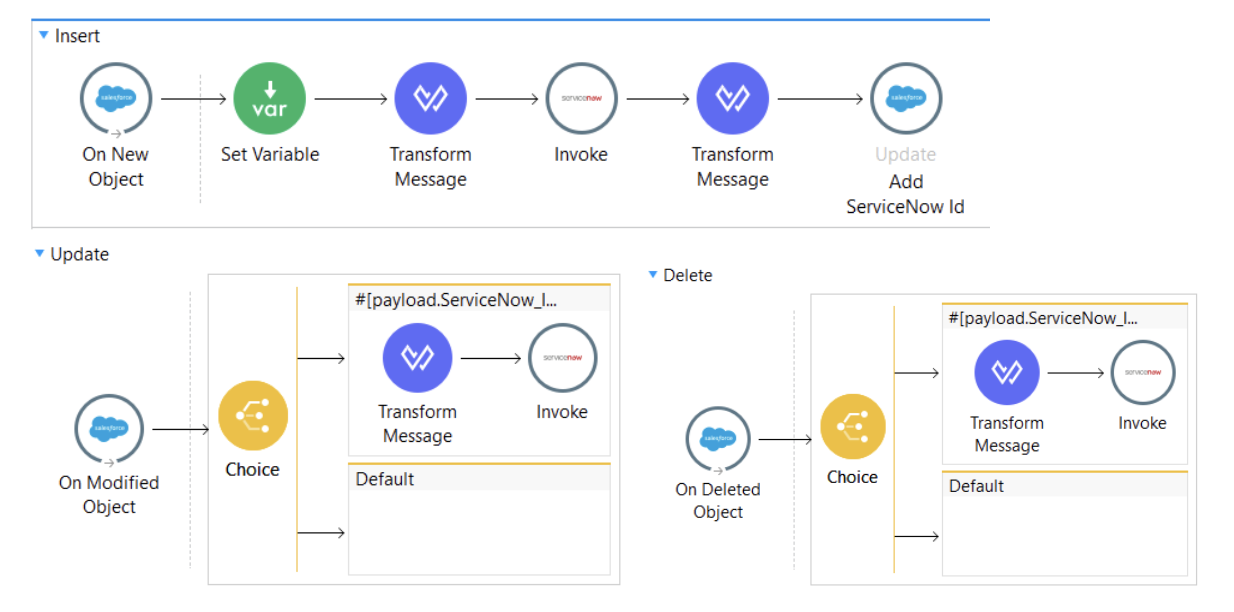
When applications records are added, changed, or removed in the Fusion Framework System, this template retrieves this information and makes the corresponding update in ServiceNow. Applications within the Fusion Framework System must contain the ServiceNow Id for the template to process the record.
Data flow
What you need
- A Fusion Framework System account
- A ServiceNow account
How to use it
- Import the template.
- Enter credentials for your Fusion Framework System account
- Enter credentials for your ServiceNow account
- Modify the Transform Message elements to reflect the data points you wish to sync
- Optionally modify the ServiceNow connector element to reflect the specific ServiceNow table you wish to sync
How to use it for different objects
This template can be modified for use with objects other than Applications.
- Modify the Salesforce Connector’s Object Type attribute to use the desired object
- Modify the ServiceNow Connector’s element to reflect the specific ServiceNow table you wish to sync
- Modify the Transform Message elements to reflect the data points you wish to sync