PatientAccessAPI
home
The Commonwealth Care Alliance Patient Access API retrieves, with the approval and at the direction of an applicable CCA member (or the member's personal representative), certain data that CCA maintains with a date of service on or after January 1, 2016 forward for all current members. This could include: concerning adjudicated claims, encounter data from capitated providers, formulary data, and clinical Data.
Overview
This asset is a component of MuleSoft Accelerator for Healthcare.
MuleSoft Accelerator for Healthcare enables healthcare providers to unlock critical patient data to build a patient 360 within Salesforce Health Cloud, faster and easier than ever before. The solution includes pre-built APIs, connectors, integration templates, and a prescriptive end-to-end reference architecture to bring patient demographics information and COVID-19 test results from any EHR into Health Cloud using HL7 V2 or FHIR standards.
The solution also provides a library of United States Core Data for Interoperability (USCDI) and FHIR R4 resources to help healthcare developers adhere to interoperability needs and jumpstart the development of healthcare digital transformation initiatives.
Conformance Language
This specification uses the conformance verbs SHALL, SHOULD and MAY:
SHALL: An absolute requirement for all implementations. The FHIR server must return this data.
SHOULD: A best practice or recommendation for the implementation. The FHIR server is recommended to return this data.
MAY: An optional inclusion for the implementation; not a requirement. The FHIR server may return the data, but there is no requirement to do so.
Security
CCA API requests often make use of patient-specific information which could be exploited by malicious actors resulting in exposure of patient data. For this reason, all CCA patient access transactions must be secured appropriately, and directed by regulations, with access limited to authorized individuals, data protected in transit, and appropriate audit measures taken.
Developers of third-party applications SHOULD be aware of these security considerations associated with FHIR transactions, particularly those related to:
- Communications
- Authentication
- Authorization/Access Control
- Audit Logging
- Digital Signatures
- Security Labels
- Narrative
Authorization, Authentication, and Registration
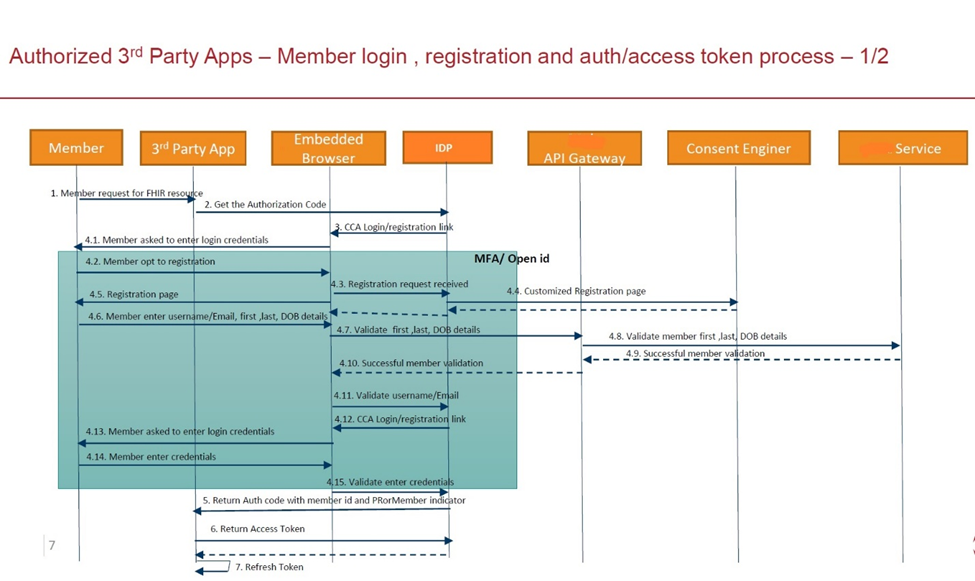
Third Party app Developers Register client application on CCA Developer Portal. All the FHIR API’s are discoverable in Developer Portal. Please Refer Developer Education.
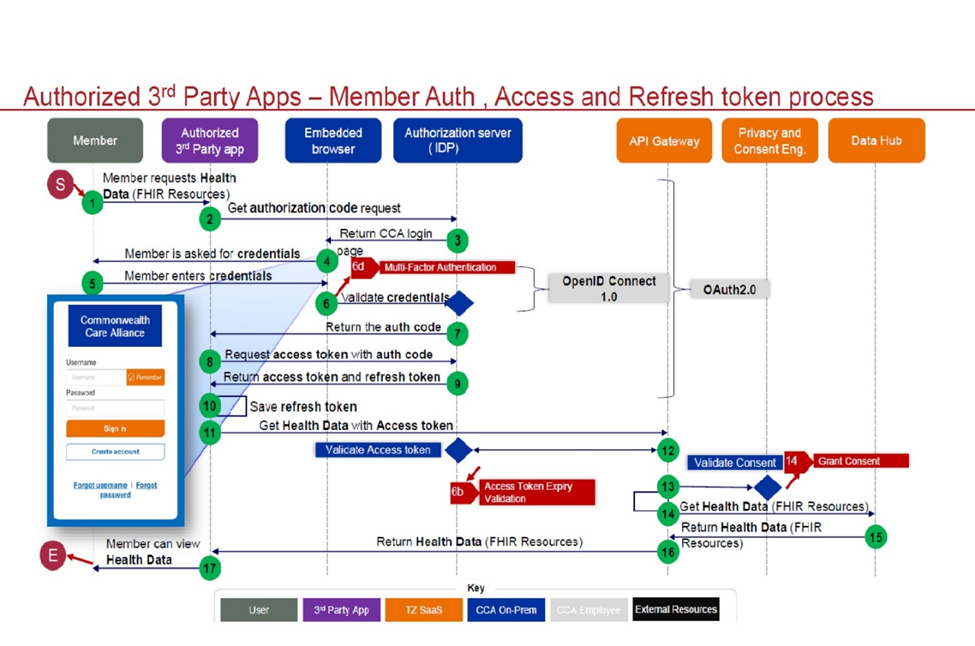
In authorization, to connect to the Patient Access API, developer need to use the OAuth 2.0. This flow should only be used by sites that can safely protect the Client ID and Client Secret, such as a site running on a secure server.
In this flow, after your application has been selected by a CCA customer, your application will send a request to the CCA Authorization endpoint. User login screen appears, If User already registered, User would provide Username and password to login, else user account should be created. Refer Authorization tab for additional details.
Once CCA customer is successfully Authenticated, code is appended to call back URL. To get authentication bearer token the developer should send the code in POST request to CCA token endpoint. You can use this token within the request header to access CCA FHIR API’s. Refer Get Token tab for additional details.
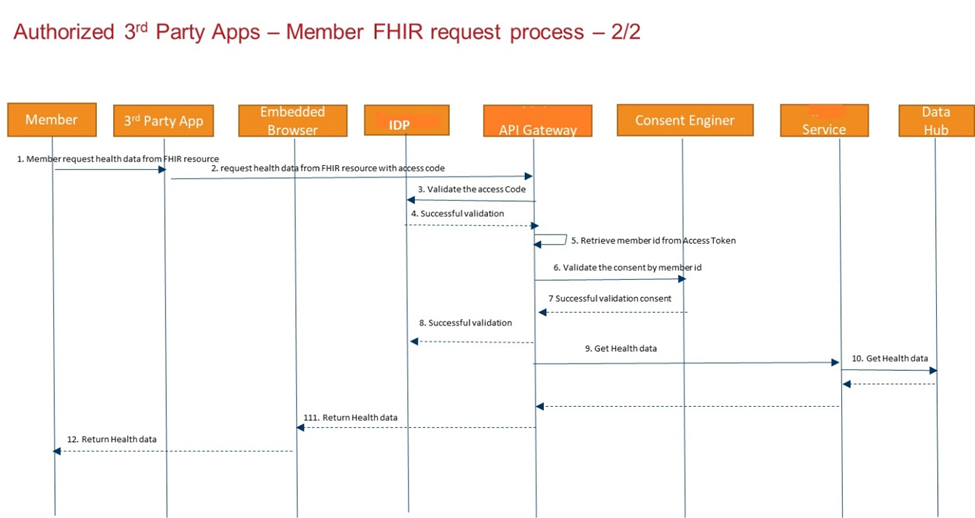
Third Party Apps SHALL specify client_id, client_secret and token to call CCA FHIR API’s else FHIR API’s will not be accessible. The client_id and client_secret key should be same keys which is received in developer portal.
Authorization:
https://3rd-party-app.test.commonwealthcarealliance.org/3rd-party-app.test.commonwealthcarealliance.org/oauth2/v2.0/authorize?p=b2c_1a_signup_signin_conditionalaccessThe Authorization request must contain the following components:
Grant Type: Authorization Code (With PKCE)
response_Type: code
state: A random number that your application generates.
client ID: The Client ID that you received when you registered your application.
scope: "https://3rd-party-app.commonwealthcarealliance.org/REPLACE_CLIENTID/patient.all.read https://3rd-party-app.test.commonwealthcarealliance.org/REPLACE_CLIENTID/REPLACE_CLIENTID openid offline_access"
code_challenge: The code challenge is created by SHA256 hashing the Code Verifier and base64 URL encoding.
code_challenge_method: SHA-256
redirect_uri: You entered this URL when you created your application and assigned it as the callback URL.
Get token:
After the user authenticates, the authorization code will append to the URL following the code=. send the authorization code, along with the client_secret, to the token endpoint of the authorization server. Send a POST request to the CCA /token endpoint
https://3rd-party-app.commonwealthcarealliance.org/3rd-party-app.commonwealthcarealliance.org/oauth2/v2.0/token?p=B2C_1A_SIGNUP_SIGNIN_CONDITIONALACCESSThe POST request must contain the following in the request body:
grant_type: < authorization_code>
code: < code received in redirect URL>
redirect_uri: < your redirect URL>
code_verifier: “cs6JLe8aglm0gnxe2JKsQyTJWzmVgdp01A_bEa”
client_id: < your ClientID>
client_secret:< your Client Secret>
The response body will contain the following:
{
    "access_token": "eyJ0eXAiOiJKV1QiLCJbbw...",
    "token_type": "Bearer",
    "not_before": 1674636737,
    "expires_in": 1800,
    "expires_on": 1674638537,
    "id_token": "eyJ0eXAiOiJKV13DJI5yR7lLcgg...",
    "id_token_expires_in": 1800,
    "profile_info": "eyJ2ZXIiOiIxLjAiLCJ0aWQ..",
    "scope": "https://3rd-party-app.commonwealthcarealliance.org/REPLACE_CLIENTID/patient.all.read https://3rd-party-app.test.commonwealthcarealliance.org/REPLACE_CLIENTID/REPLACE_CLIENTID openid offline_access",
    "refresh_token": "eyJraWQiOiJjcGltY29yZnyPb3ygfo_XoX0xIwJ..",
    "refresh_token_expires_in": 1209600
}
You can now use this token within the request header in your calls to the CCA FHIR server.
FHIR RESTful API Capabilities
Implements RESTful behaviors according to the FHIR specification.
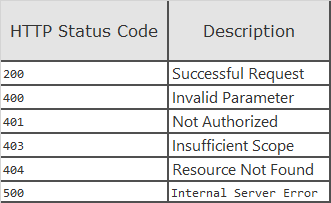
Returns the following http status codes:
Note: For more information about the FHIR RESTful API, please refer to the HL7® FHIR® RESTful API topics.
Search Syntax
To search resource interactions, use the following syntax:
GET [base]/[Resource-type]?[parameter1]{:m1|m2|...}={c1|c2|...}[value1{,value2,...}]{&[parameter2]{:m1|m2|...}={c1|c2|...}[value1{,value2,...}]&....}
GET: the HTTP verb used to fetch the resource
Variables surrounded by " " are mandatory for the client to supply, and will be replaced by the string literal identified.
Variables surrounded by "{ }" are optional for the client to supply, and will be replaced by the string literal identified.
base: The Service Root URL
Resource-type: The name of a resource type (e.g "Patient")
parameter: The search parameters as defined for the particular interaction (e.g. "?patient=Patient/123")
value: the search parameter value for a particular search
Note: For values of type Token, the syntax {system|}[code] means that the system value is optional for the client to supply.
{:m1|m2|...}: The list of supported search parameter modifiers
{c1|c2|...}: The list of supported search parameter comparators
{,value2,...}: Optional multiple "OR" values
{¶meter2={:m1 m2 ...}={c1 c2 ...}[value1{,value2,...}&...}: Optional multiple "AND" search parameters
In the simplest case, a search is executed by performing a GET operation in the RESTful framework:
GET [base]/[Resource-type]?name=value&...
For this RESTful search, the parameters are a series of name=[value] pairs encoded in the URL. The search parameter names are defined for each resource. For example, the Observation resource the name "code" for search on the LOINC code.
Note: For more information about how the search resource interactions are handled, refer to the HL7® FHIR® Search topic.