Onboarding API - V2
Onboarding/Management API Integration Guide
This API facilitates the seamless onboarding of new companies, stores, solutions, and other entities into our system. It is designed to streamline your integration process, enabling your organization to quickly and securely configure your payment ecosystem without manual intervention.
1. Environments & Base URLs
Onboarding
| Environment | Base URL | Token Generation URL |
|---|---|---|
| Production | https://api.market-pay.com/v2/onboarding/api | https://api.market-pay.com/v2/auth/api/token |
| Staging | https://api-rec.market-pay.com/v2/onboarding/api | https://api-rec.market-pay.com/v2/auth/api/token |
Management
| Environment | Base URL | Token Generation URL |
|---|---|---|
| Production | https://api.market-pay.com/management/api | https://api.market-pay.com/v2/auth/api/token |
| Staging | https://api-rec.market-pay.com/management/api | https://api-rec.market-pay.com/v2/auth/api/token |
2. Authentication & Security
APIs are secured using JWT (JSON Web Token) authentication.
Every request sent must include a valid JWT token in the Authorization header:
Authorization: Bearer <your_jwt_token>
⚠️ Important Token Note
The Onboarding API and Management API require a V2 Token. Do not use V1 tokens generated from legacy auth endpoints.
Token validity is 1 hour in Production and 8 hours in Staging.
How to Obtain a V2 Token
Send a POST request to the token URL corresponding to your environment with the following headers provided by your Market Pay Account Representative:
| Header Name | Required | Description | Example |
|---|---|---|---|
client_id | TRUE | Found under 'My Applications' section after login | h515c5a6d534406cbad56c96cb747242 |
client_secret | TRUE | Found under 'My Applications' section after login | 451ba70DCDA49676Ac9A9E12a9af94e7 |
3. Data Model Hierarchy
All entity management in Market Pay follows a strict parent-child hierarchy. Understanding this hierarchy is key to executing your API calls in the correct sequence.
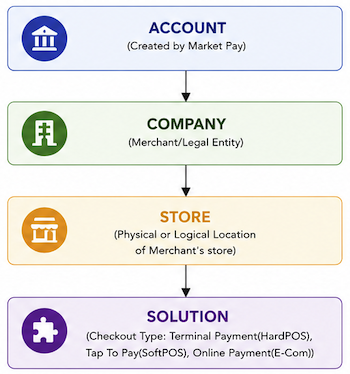
- Account: Top-level container. This is created internally by Market Pay when your contract is finalized.
- Company: The legal merchant entity. Holds regulatory information and KYC details.
- Store: A physical retail outlet, e-commerce domain, or logical business unit operating under a Company.
- Solution (Checkout Type): The payment delivery mechanism operating inside a Store (e.g., SoftPOS mobile app, physical HardPOS terminals, or Web Gateways).
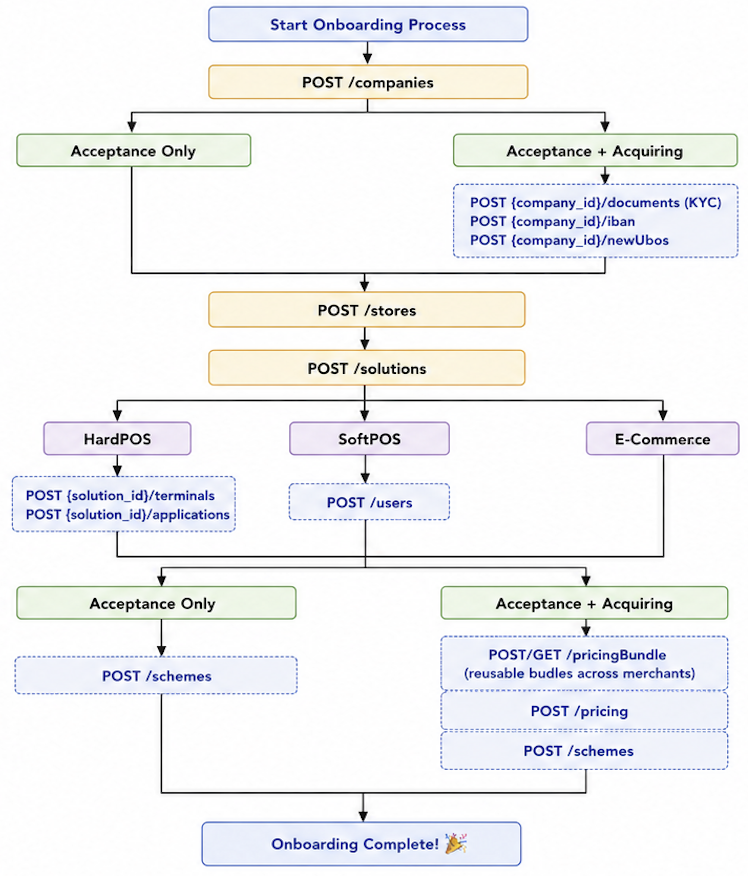
4. End-to-End Onboarding Decision Workflow
Refer to the flowchart below to determine the precise sequence of API requests required for your business model:
⚠️ Important Token Note
Pricing Bundle is a way to re-use same pricing across merchants and solutions. Completely optional.
5. Onboarding API V2 vs. Management API
To keep your integration clean, understand the boundary between initial onboarding and day-2 operations:
Onboarding API
Used exclusively during initial setup to build the:
Account → Company → Store → Solution
hierarchy and run activation workflows.
Management API
Used for Day-2 operations after onboarding is complete.
Use this API for operations like:
- add additional HardPOS terminal serial numbers
- new users to SoftPOS
- update store details
- edit bank accounts