Veeva CTMS System API
Description
- The API facilitates various operations like create, upsert, read veeva objects/entities data.
- This API also helps to Fetch the reference data of Picklists,Objecttype,Objectlifecycle,Object of the Organization Entity.
- This is generic API currently provide fetching details of various veeva objects
- Data Items that need to be Synced can be categorized as below:
- Master Data Items
- Organisation
- Location
- Person
- Study
- Milestone
- MilestoneTemplate
- IISStudy
- IISStudyCountry
- Study Related/Transactional Data Items
- Study Country
- Study Site
- EnrollmentMetrics (Reported_Result)
- Data Items that need to be Synced can be categorized as below:
- This API serves as a design for API Led Connectivity approach of running an enterprise. This System API connects with Veeva CTMS.
- The API is designed as a REST API using RAML definition and uses JSON as an exchange format. Included are example requests and responses.
How to start?
More details about the process in Mulesoft Anypoint Exchange is available via the Support page.
Note: All requests that did not start from the Service Now request form will be rejected.
Intended Use
Create subject records in Veeva.
The System API has below functionality(v2.0)
| Sr No | Resource | Method | Description |
|---|---|---|---|
| 1 | /HealthCheck | GET | This resource confirms the health of the Application. |
| 2 | /query | POST | To get object records from Veeva based on VQL. |
| 3 | /query/{paginationUrl} | POST | Allows you to paginate results. |
| 4 | /configuration/{component_type} | GET | Retrieve all records for a specific component type. |
| 5 | /vobjects/{object_name} | GET | Retrieve all records for a specific Vault Object. |
| 6 | /vobjects/{object_name} | POST | Create Object Records in bulk. |
| 7 | /vobjects/{object_name}/{object_record_id} | GET | Retrieve metadata configured on a specific object record in your Vault. |
| 8 | /vobjects/{object_name}/{object_record_id}/attachments | GET | Retrieve a list of all attachments on a specific object record. |
| 9 | /vobjects/{object_name}/{object_record_id}/attachments | POST | Create a single object record attachment. |
| 10 | /vobjects/{object_name}/{object_record_id}/actions/{action_name} | POST | To initiate an action on a specific object record. |
| 11 | /objects/picklists/{picklist_name} | GET | Retrieve all available values configured on a picklist. |
| 12 | /services/loader/load | POST | Create a loader job load a set of data files. |
| 13 | /services/loader/{job_id}/tasks/{task_id}/results | GET | To retrieve results of a specified job task. |
| 14 | /services/loader/{job_id}/tasks/{task_id}/results/renditions | GET | To retrieve results of a specified job task that includes renditions requested with documents. |
| 15 | /auth | POST | Authenticate your account using your Vault user name and password to obtain Vault Session ID. |
| 16 | /auth/oauth/session/{oath_oidc_profile_id} | POST | Authenticate your account using OAuth 2.0 / Open ID Connect token to obtain a Vault Session ID. |
Submitting a Query
GET: /query: Submitting a Query
VQL queries go to the /query REST interface.
Headers
| Name | Description |
|---|---|
| Accept | application/json (default) |
| Content-Type | application/json |
| X-VaultAPI-DescribeQuery | Set to true to include static field metadata in the response for the data record. If not specified, the response does not include any static field metadata. This option eliminates the need to make additional API calls to understand the shape of query response data. |
| X-VaultAPI-RecordProperties | Optional: If present, the response includes the record properties object. Possible values are all, hidden, redacted, and weblink. If omitted, the record properties object is not included in the response. |
| sourceApp | source application name (rave/veeva2pdil/mdms/veevaups/datadog). |
| username | username |
| password | Base64 encrypted password |
Body Parameters
| Name | Description |
|---|---|
| query | Place your query of up to 50,000 characters in the body of your request. |
Request Body
{
    "query": "SELECT legacy_object_id__c,status__v,created_date__v,modified_date__v,created_by__v,modified_by__v,id,first_name__sys,last_name__sys from person__sys WHERE id CONTAINS ('V0B00000000A907')"
}
Response Details
On SUCCESS, the response includes the following information:
| Name | Description |
|---|---|
| pagesize | The number of records displayed per page. This can be modified. |
| pageoffset | The records displayed on the current page are offset by this number of records. |
| size | The total number of records displayed on the current page. |
| total | The total number of records found. |
| previous_page | The Pagination URL to navigate to the previous page of results. This is not always available. |
| next_page | The Pagination URL to navigate to the next page of results. This is not always available. |
| data | All records found. |
Response
{
   "responseStatus": "SUCCESS",
   "queryDescribe": {
       "object": {
           "name": "documents",
           "label": "documents",
           "label_plural": "documents"
       },
       "fields": [
           {
               "type": "id",
               "required": true,
               "name": "id"
           },
           {
               "label": "Name",
               "type": "String",
               "required": true,
               "name": "name__v",
               "max_length": 100
           }
       ]
   },
   "responseDetails": {
       "pagesize": 1000,
       "pageoffset": 0,
       "size": 5,
       "total": 5
   },
   "data": [
       {
           "id": 72,
           "name__v": "Cholecap-2021-brochure"
       },
       {
           "id": 63,
           "name__v": "Cholecap - Multisequence"
       },
       {
           "id": 36,
           "name__v": "Cholecap Study"
       },
       {
           "id": 25,
           "name__v": "Clinical Trial Reference"
       },
       {
           "id": 24,
           "name__v": "Formulary Guidelines"
       }
   ]
}
Paginating Results
POST: /query/{paginationUrl}
After you submit a query, the Vault REST API returns the first page of query results instead of all results at once. When the number of query results is greater than the page size, the response provides next_page and previous_page URLs for pagination. These URLs include information from the original query and allow you to paginate results with a POST request. We recommend using the next_page and previous_page URLs over manual pagination with PAGEOFFSET.
The next_page and previous_page endpoints only remain active for 20 minutes after you submit the original query. After that, you must resubmit the original query.
When querying workflows (legacy), events, or users, the response does not include the next_page or previous_page URL endpoints and displays all results on one page. In these cases, submit additional queries using PAGEOFFSET to paginate over the result set.
Retrieve Component Records
Component Record Collection
GET: /configuration/{component_type}
Retrieve all records for a specific component type.
URI Path Parameters
| Name | Description |
|---|---|
| {component_type} | The component type name (Picklist, Docfield, Doctype, etc.). |
Headers
| Name | Description |
|---|---|
| sourceApp | source application name (rave/veeva2pdil/mdms/veevaups/datadog). |
| username | username |
| password | Base64 encrypted password |
Response Details
On SUCCESS, the response contains all component records in the Vault for the specified component type. Each component record returns a minimum of API name and UI label, but most types return more. Complete details of the component can be retrieved using Retrieve Component Record or MDL.
Response
{
    "responseStatus": "SUCCESS",
    "data": [
        {
            "name": "color__c",
            "label": "Color",
            "Picklistentry": [
                {
                    "name": "red__c",
                    "value": "Red",
                    "order": 1,
                    "active": true
                },
                {
                    "name": "blue__c",
                    "value": "Blue",
                    "order": 2,
                    "active": true
                },
                {
                    "name": "green__c",
                    "value": "Green",
                    "order": 3,
                    "active": true
                }
            ],
            "active": true,
            "used_in": []
        }
    ]
}
Retrieve Object Record Collection
GET: /vobjects/{object_name}
Retrieve all records for a specific Vault Object.
| Name | Description |
|---|---|
| sourceApp | source application name (rave/veeva2pdil/mdms/veevaups/datadog). |
| username | username |
| password | Base64 encrypted password |
URI Path Parameters
| Name | Description |
|---|---|
| {object_name} | The object name__v field value (product__v, country__v, custom_object__c, etc.). |
Query Parameters
| Name | Description |
|---|---|
| fields | To specify fields to retrieve, include the parameter fields={FIELD_NAMES}. |
Response Details
The response includes the object metadata for the specified object and the id and name__v of all object records configured on the object.
Response
{
    "responseStatus": "SUCCESS",
    "responseDetails": {
        "total": 3,
        "limit": 200,
        "offset": 0,
        "url": "/api/v20.1/vobjects/product__v",
        "object": {
            "url": "/api/v20.1/metadata/vobjects/product__v",
            "label": "Product",
            "name": "product__v",
            "prefix": "0PR",
            "order": 1,
            "source": "standard",
            "status": [
                "active__v"
            ],
            "label_plural": "Products",
            "in_menu": true
    },
    "data": [
        {
            "id": "0PR0202",
            "name__v": "CholeCap"
        },
        {
            "id": "0PR0303",
            "name__v": "Gludacta"
        },
        {
            "id": "0PR0404",
            "name__v": "Nyaxa"
        }
    ]
  }
}
Create Object Records
POST: /vobjects/{object_name}
Create Object Records in bulk.
You can use this endpoint to create User Tasks or User (user__sys) records. Learn more about User Tasks and the User & Person Objects in Vault Help.
- The maximum input file size is 1GB.
- The values in the input must be UTF-8 encoded.
- The maximum batch size is 500.
Note that you can only add relationships on object fields using ID values or based on a unique field on the target object. This API does not support object lookup fields.
Headers
| Name | Description |
|---|---|
| X-VaultAPI-MigrationMode | Set to true to create object records in a specific state or state type. If not specified, records will be created in their initial state. You must have the Record Migration permission to use this header. |
| sourceApp | source application name (rave/veeva2pdil/mdms/veevaups/datadog). |
| username | username |
| password | Base64 encrypted password |
URI Path Parameters
| Name | Description |
|---|---|
| {object_name} | The name of the object, for example, product__v. |
Body Parameters
Upload parameters as a JSON.
| Name | Description |
|---|---|
| name__v | This field is required unless it is set to system-managed. To find out if an object uses system-managed naming, retrieve its name__v field and look for the system_managed_name property set to true or false. |
| object_type__v | Optional: To create objects of a specific object type, add this field with the id of the object type. |
| object_type__v.api_name__v | Optional: To create objects of a specific object type, add this field with the name of the object type. |
| source_record_id | Optional: To copy an existing object record, add this field with the id of the existing object record. Any values specified for other fields will override the copied values. |
| state__v | Optional: Specifies the lifecycle state of the record when X-VaultAPI-MigrationMode is set to true. For example, draft_state__c. |
| state_label | Optional: Specifies the lifecycle state type of the record when X-VaultAPI-MigrationMode is set to true. Use the format base:object_lifecycle: followed by the object state type. For example base:object_lifecycle:initial_state_type. When providing both a state and state type, the statelabel value must map to the provided state\_v value. For example, if the state__v value is set to draft_state__c, the state_label value must already be set to draft in the destination Vault. |
Note that if objecttype\_v and objecttype\_v.apiname\_v are both included, Vault creates the object with the type specified in objecttype\_v.
Query Parameters: Upsert Object Records
Upsert is a combination of create and update. With idParam, you can identify an object record by any unique object field. This allows you to use one input file to create new object records and update existing records at the same time. If a matching record exists, Vault updates the record with the unique field values specified in the input. If no matching object record exists, Vault creates a new record using the values in the input.
| Name | Description |
|---|---|
| idParam | To upsert object records, add idParam={field_name} to the request endpoint. For example, idParam=external_id__v. Note that the specified object field must have unique set to true in the object metadata. |
Request Body
[
{
    "name__v": "Cholecap",
    "generic_name__vs": "cholepriol phosphate",
    "product_family__vs": "cholepriol__c",
    "abbreviation__vs": "CHO",
    "external_id__v": "CHO-1110",
    "therapeutic_area__vs": "cardiology__vs",
    "manufacturer_name__v": "Veeva Labs",
    "regions__c": "north_america__c"
},
{
    "name__v": "Nyaxa",
    "generic_name__vs": "nitroprinaline oxalate",
    "product_family__vs": "nitroprinaline__c",
    "abbreviation__vs": "NYA",
    "external_id__v": "NYA-2220",
    "therapeutic_area__vs": "veterinary__c",
    "manufacturer_name__v": "Veeva Labs",
    "regions__c": "europe__c"
}
]
Response
{
    "responseStatus": "SUCCESS",
    "data": [
        {
            "responseStatus": "SUCCESS",
            "data": {
                "id": "0PR0771",
                "url": "api/v8.0/vobjects/product__v/0PR0771"
            }
        },
        {
            "responseStatus": "SUCCESS",
            "data": {
                "id": "0PR0772",
                "url": "api/v8.0/vobjects/product__v/0PR0772"
            }
        },
        {
            "responseStatus": "SUCCESS",
            "data": {
                "id": "0PR0773",
                "url": "api/v8.0/vobjects/product__v/0PR0773"
            }
        },
        {
            "responseStatus": "FAILURE",
            "errors": [
                {
                    "type": "INVALID_DATA",
                    "message": "Error message describing why this object record was not created."
                }
            ]
        }
    ]
}
Retrieve Object Record
GET /vobjects/{object_name}/{object_record_id}
Retrieve metadata configured on a specific object record in your Vault.
Headers
| Name | Description |
|---|---|
| sourceApp | source application name (rave/veeva2pdil/mdms/veevaups/datadog). |
| username | username |
| password | Base64 encrypted password |
URI Path Parameters
| Name | Description |
|---|---|
| {object_name} | The object name__v field value (product__v, country__v, custom_object__c, etc.). |
| {object_record_id} | The object record id field value |
Response Details
On SUCCESS, the response lists all fields and values configured on the object record.
When Custom Sharing Rules have been enabled on the object ("dynamic_security": true), the response includes the following additional information:
manually_assigned_sharing_roles
- owner__v
- viewer__v
- editor__v
These are the users and groups that have been manually assigned to each role on the object record.
Not all object records will have users and groups assigned to roles. You can update object records to add or remove users and/or groups on each role.
Response
{
  "responseStatus": "SUCCESS",
  "responseDetails": {
    "url": "/api/v20.1/vobjects/product__v/00PR0202",
    "object": {
      "url": "/api/v20.1/metadata/vobjects/product__v",
      "label": "Product",
      "name": "product__v",
      "label_plural": "Products",
      "prefix": "00P"
    }
  },
  "data": {
    "external_id__v": "CHO-457",
    "product_family__c": [
      "cholepriol__c"
    ],
    "compound_id__c": "CHO-55214",
    "abbreviation__c": "CHO",
    "therapeutic_area__c": [
      "endocrinology__c"
    ],
    "name__v": "CholeCap",
    "modified_by__v": 12022,
    "modified_date__v": "2016-05-10T21:06:11.000Z",
    "inn__c": null,
    "created_date__v": "2015-07-30T20:55:16.000Z",
    "id": "00PR0202",
    "internal_name__c": null,
    "generic_name__c": "cholepridol phosphate",
    "status__v": [
      "active__v"
    ],
    "created_by__v": 1
  },
  "manually_assigned_sharing_roles": {
    "owner__v": {
      "groups": null,
      "users": [
        12022
      ]
    },
    "viewer__v": {
      "groups": [
        3311303
      ],
      "users": [
        35551,
        48948,
        55002
      ]
    },
    "editor__v": {
      "groups": [
        4411606
      ],
      "users": [
        60145,
        70012,
        89546
      ]
    }
  }
}
Retrieve Object Record Attachments
GET: /vobjects/{object_name}/{object_record_id}/attachments
Retrieve a list of all attachments on a specific object record.
Headers
| Name | Description |
|---|---|
| sourceApp | source application name (rave/veeva2pdil/mdms/veevaups/datadog). |
| username | username |
| password | Base64 encrypted password |
URI Path Parameters
| Name | Description |
|---|---|
| {object_name} | The object name__v field value (product__v, country__v, custom_object__c, etc.). |
| {object_record_id} | The object record id field value |
Response Details
Shown above, the site__v object record has three versions of attachment id 558 and one version of attachment id 571. Attachment versioning uses integer numbers beginning with 1 and incrementing sequentially (1, 2, 3,…). There is no concept of major or minor version numbers with attachments.
Response
{
    "responseStatus": "SUCCESS",
    "data": [
        {
            "id": 558,
            "filename__v": "Site Contact List.docx",
            "description__v": "Facilities information and contacts",
            "format__v": "application/vnd.openxmlformats-officedocument.wordprocessingml.document",
            "size__v": 11450,
            "md5checksum__v": "9c6f61847207898ca98431d3e9ad176d",
            "version__v": 3,
            "created_by__v": 46916,
            "created_date__v": "2015-01-07T21:42:47.772Z",
            "versions": [
                {
                    "version__v": 1,
                    "url": "https://myvault.veevavault.com/api/v20.1/vobjects/site__v/1357752909483/attachments/558/versions/1"
                },
                {
                    "version__v": 2,
                    "url": "https://myvault.veevavault.com/api/v20.1/vobjects/site__v/1357752909483/attachments/558/versions/2"
                },
                {
                    "version__v": 3,
                    "url": "https://myvault.veevavault.com/api/v20.1/vobjects/site__v/1357752909483/attachments/558/versions/3"
                }
            ]
        },
        {
            "id": 571,
            "filename__v": "Site Area Map.png",
            "format__v": "image/png",
            "size__v": 109828,
            "md5checksum__v": "78b36d9602530e12051429e62558d581",
            "version__v": 1,
            "created_by__v": 46916,
            "created_date__v": "2015-01-16T22:28:44.039Z",
            "versions": [
                {
                    "version__v": 1,
                    "url": "https://myvault.veevavault.com/api/v20.1/vobjects/site__v/1357752909483/attachments/571/versions/1"
                }
            ]
        }
    ]
}
Create Object Record Attachment
POST /api/{version}/vobjects/{object_name}/{object_record_id}/attachments
Create a single object record attachment. If the attachment already exists, Vault uploads the attachment as a new version of the existing attachment.
Headers
| Name | Description |
|---|---|
| Content-Type | multipart/form-data |
| sourceApp | source application name (rave/veeva2pdil/mdms/veevaups/datadog). |
| username | username |
| password | Base64 encrypted password |
URI Path Parameters
| Name | Description |
|---|---|
| {object_name} | The object name__v field value (product__v, country__v, custom_object__c, etc.). |
| {object_record_id} | The object record id field value |
File Upload
To upload the file, use the multi-part attachment with the file component "file={file_name}". The maximum allowed file size is 4GB.
If an attachment is added which has the same filename as an existing attachment on a given object record, the new attachment is added as a new version of the existing attachment. If an attachment is added which is exactly the same (same MD5 checksum value) as an existing attachment on a given object record, the new attachment is not added.
The following attribute values are determined based on the file in the request: filename__v, format__v, size__v.
Response
{
    "responseStatus": "SUCCESS",
    "data":
    [{
        "id": "558",
        "version__v": 3
    }]
}
Initiate Object Action on a Single Record
POST /vobjects/{object_name}/{object_record_id}/actions/{action_name}
Use this request to initiate an action on a specific object record.
Headers
| Name | Description |
|---|---|
| Content-Type | application/x-www-form-urlencoded |
| sourceApp | source application name (rave/veeva2pdil/mdms/veevaups/datadog). |
| username | username |
| password | Base64 encrypted password |
URI Path Parameters
| Name | Description |
|---|---|
| {object_name} | The object name__v field value (product__v, country__v, custom_object__c, etc.). |
| {object_record_id} | The object record id field value |
| action_name | The name of the Objectaction or Objectlifecyclestateuseraction to initiate. You can retrieve this from the Retrieve User Actions request. The format for action_name is Objectaction.vobject.action or Objectlifecyclestateuseraction.vobject.state.action. |
Body Parameters
Include any parameters required to initiate the action as name-value pairs in the request body. You can retrieve the required parameters for your action by Retrieving Object User Action Details.
| Name | Description |
|---|---|
| storyEventKey | Optional: The ID of the target Story Event object record when executing the Apply Milestone Template action. This is only applicable in Clinical Operations Vaults. |
Response
{
    "responseStatus": "SUCCESS"
}
Retrieve Picklist Values
GET /objects/picklists/{picklist_name}
Retrieve all available values configured on a picklist.
Headers
| Name | Description |
|---|---|
| sourceApp | source application name (rave/veeva2pdil/mdms/veevaups/datadog). |
| username | username |
| password | Base64 encrypted password |
URI Path Parameters
| Name | Description |
|---|---|
| {picklist_name} | The picklist name field value (license_type__v, product_family__c, region__c, etc.) |
Response Details
| Name | Description |
|---|---|
| name | The picklist value name. This is used only in the API and displayed in the Admin UI. |
| label | The picklist value label. This is used in the API and UI. Users see the label when selecting picklist values. |
Response
{
  "responseStatus": "SUCCESS",
  "responseMessage": "Success",
  "picklistValues": [
    {
      "name": "full__v",
      "label": "Full User"
    },
    {
      "name": "read_only__v",
      "label": "Read-only User"
    },
    {
      "name": "external__v",
      "label": "External User"
    },
    {
      "name": "view_based__v",
      "label": "View-Based User"
    }
  ]
}
Multi-File Load
Load Data Objects
POST /services/loader/load
Create a loader job load a set of data files.
Headers
| Name | Description |
|---|---|
| sourceApp | source application name (rave/veeva2pdil/mdms/veevaups/datadog). |
| username | username |
| password | Base64 encrypted password |
Body Parameters
The body of your request should be a JSON file containing the set of data objects to extract.
| Name | Description |
|---|---|
| object_type | The type of data object to load. |
| object | If the object_type = vobjects__v, include the object name. For example, product__v. |
| action | The action type to create, update, upsert, or delete objects or object record roles. |
| file | Include the filepath to reference the load file on the FTP server. |
| order | Specifies the order of the load task. |
| idparam | Optional: Identify object records by any unique field value. Can only be used if objecttype is vobjects\_v, action is upsert, update, or delete, and the specified object field has unique set to true in the object metadata. |
| X-VaultAPI-MigrationMode | Optional: Set to true to create object records in a specific state or state type for objects with lifecycles. If not specified, records will be created in their initial state. X-VaultAPI-MigrationMode can only be used if object_type is vobjects__V and action is create. You must have the Record Migration permission to use this parameter. |
Query Parameters
| Name | Description |
|---|---|
| sendNotification | To send a Vault notification when the job completes, set to true. If omitted, this defaults to false and Vault does not send a notification when the job completes. |
Request Body
[
  {
    "object_type": "documents__v",
    "action": "create",
    "file": "documents.csv",
    "order": 1
  },
  {
    "object_type": "vobjects__v",
    "object": "product__v",
    "action": "upsert",
    "file": "products.csv",
    "order": 2,
    "idparam": "extenal_id__v"
  },
  {
    "object_type": "vobjects__v",
    "object": "annotation_keywords__sys",
    "action": "create",
    "file": "claims.csv",
    "order": 3,
    "X-VaultAPI-MigrationMode": true
  },
  {
    "object_type": "groups__v",
    "action": "update",
    "file": "groups.csv",
    "order": 4
  }
]
Response
{
    "responseStatus": "SUCCESS",
    "url": "/api/v20.1/services/jobs/192102",
    "job_id": 192102,
    "tasks": [
        {
            "task_id": "1",
            "object_type": "documents__v",
            "action": "create",
            "file": "documents.csv"
        },
        {
            "task_id": "2",
            "object_type": "vobjects__v",
            "object": "product__v",
            "action": "upsert",
            "idparam": "extenal_id__v",
            "file": "products.csv"
        },
        {
            "task_id": "3",
            "object_type": "vobjects__v",
            "object": "annotation_keywords__sys",
            "action": "create",
            "X-VaultAPI-MigrationMode": true,
            "file": "claims.csv"
        },
        {
            "task_id": "4",
            "object_type": "groups__v",
            "action": "update",
            "file": "groups.csv"
        }
    ]
}
Retrieve Loader Extract Results
GET /services/loader/{job_id}/tasks/{task_id}/results
After submitting a request to extract object types from your Vault, you can query Vault to retrieve results of a specified job task.
Headers
| Name | Description |
|---|---|
| sourceApp | source application name (rave/veeva2pdil/mdms/veevaups/datadog). |
| username | username |
| password | Base64 encrypted password |
URI Path Parameters
| Name | Description |
|---|---|
| job_id | The id value of the requested extract job. |
| task_id | The id value of the requested extract task. |
Response Details
On SUCCESS, the response includes a CSV file of the results of a specific extract job task.
Response (csv)
file,rendition_type__v,id,name__v,type__v
/61915/50/0_1/renditions/viewable_rendition__v.pdf,viewable_rendition__v,50,Facts about High Cholesterol Spring 2016,Promotional Material
/61915/8/0_1/renditions/viewable_rendition__v.pdf,viewable_rendition__v,8,ashley-harvey,Personnel
Retrieve Loader Extract Renditions Results
GET: /services/loader/{job_id}/tasks/{task_id}/results/renditions
After submitting a request to extract object types from your Vault, you can query Vault to retrieve results of a specified job task that includes renditions requested with documents.
Headers
| Name | Description |
|---|---|
| sourceApp | source application name (rave/veeva2pdil/mdms/veevaups/datadog). |
| username | username |
| password | Base64 encrypted password |
URI Path Parameters
| Name | Description |
|---|---|
| job_id | The id value of the requested extract job. |
| task_id | The id value of the requested extract task. |
Response Details
On SUCCESS, the response includes a CSV file that includes rendition files for documents or document versions.
Response
file,rendition_type__v,id,name__v,type__v
/61915/50/0_1/renditions/viewable_rendition__v.pdf,viewable_rendition__v,50,Facts about High Cholesterol Spring 2016,Promotional Material
/61915/8/0_1/renditions/viewable_rendition__v.pdf,viewable_rendition__v,8,ashley-harvey,Personnel
User Name and Password
POST: /auth
Authenticate your account using your Vault user name and password to obtain Vault Session ID. Vault limits the number of Authentication API calls based on the user name and the domain name used in the API call.
Headers
| Name | Description |
|---|---|
| Content-Type | application/json |
Body Parameters
| Name | Description |
|---|---|
| username | Your Vault user name assigned by your administrator. |
| password | Your Vault password associated with your assigned Vault user name in base64 encrypted format. |
| vaultDNS | Optional: The DNS of the Vault for which you want to generate a session. If omitted, generates a session for the domain specified in vault_subdomain. If both vault_subdomain and vaultDNS are invalid, generates a session for the user’s default Vault. |
Request Body
{
    "username" : "test.username.dev@sb-roche.com",
    "password" : "cjMyenBnbllzV0c5UVlrag=="
}
Response
{
  "responseStatus": "SUCCESS",
  "sessionId": "3B3C45FD240E26F0C3DB4F82BBB0C15C7EFE4B29EF9916AF41AF7E44B170BAA01F232B462BE5C2BE2ACB82F6704FDA216EBDD69996EB23A6050723D1EFE6FA2B",
  "userId": 12021,
  "vaultIds": [
    {
      "id": 1776,
      "name": "PromoMats",
      "url": "https://promomats-veevapharm.veevavault.com/api"
    },
    {
      "id": 1777,
      "name": "eTMF",
      "url": "https://etmf-veevapharm.veevavault.com/api"
    },
    {
      "id": 1779,
      "name": "QualityDocs",
      "url": "https://qualitydocs-veevapharm.veevavault.com/api"
    }
  ],
  "vaultId": 1776
}
OAuth 2.0 / OpenID Connect
POST: /auth/oauth/session/{oath_oidc_profile_id}
Authenticate your account using OAuth 2.0 / Open ID Connect token to obtain a Vault Session ID.
When requesting a sessionId, Vault allows the ability for Oauth2/OIDC client applications to pass the client_id with the request. Vault uses this client_id when talking with the introspection endpoint at the authorization server to validate that the access_token presented by the application is valid.
Headers
| Name | Description |
|---|---|
| Authorization | Bearer {access_token} |
URI Path Parameters
| Name | Description |
|---|---|
| oath_oidc_profile_id | The ID of your OAuth2.0 / Open ID Connect profile. |
Body Parameters
| Name | Description |
|---|---|
| vaultDNS | Optional: The DNS of the Vault for which you want to generate a session. If omitted, the session is generated for the user’s default Vault. |
| client_id | Optional: The ID of the client application at the Authorization server. |
Response
{
  "responseStatus": "SUCCESS",
  "sessionId": "3B3C45FD240E26F0C3DB4F82BBB0C15C7EFE4B29EF9916AF41AF7E44B170BAA01F232B462BE5C2BE2ACB82F6704FDA216EBDD69996EB23A6050723D1EFE6FA2B",
  "userId": 12021,
  "vaultIds": [
    {
      "id": 1776,
      "name": "PromoMats",
      "url": "https://promomats-veevapharm.veevavault.com/api"
    },
    {
      "id": 1777,
      "name": "eTMF",
      "url": "https://etmf-veevapharm.veevavault.com/api"
    },
    {
      "id": 1779,
      "name": "QualityDocs",
      "url": "https://qualitydocs-veevapharm.veevavault.com/api"
    }
  ],
  "vaultId": 1776
}
Authentication:
- When you send a request, the request must include authentication information.
- In each API request that you send, set "sourceApp", "username" and "password (base64 encrypted password)" in headers.
High-Level Design
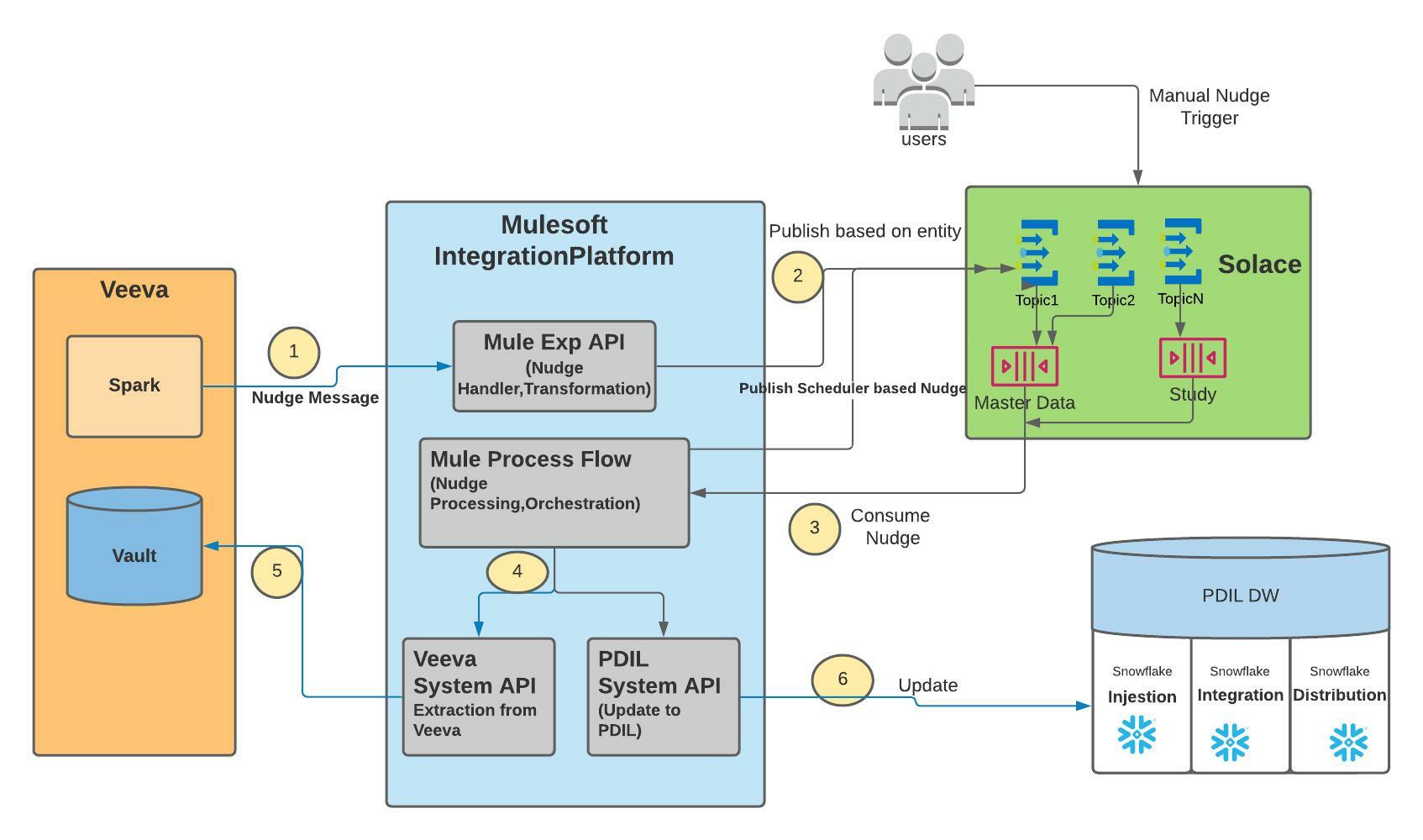
Business Case
Business need an interface to help Automate migration of Master data items and Study specific data items from Veeva CTMS vault to PDIL.
Data Items that need to be Synced can be categorized as below:
- Master Data Items
- Organisation
- Location
- Person
- Study
- Milestone
- MilestoneTemplate
- IISStudy
- IISStudyCountry
Study Related/Transactional Data Items
- Study Country
- Study Site
- EnrollmentMetrics (Reported_Result)
The Master Data and Study items should be limited to these sub types and attributes where Veeva Vault is the SoR
Technical details
Interested in knowing how it works behind the scenes? Further documentation on requirements and solution design can be found in the Roche wiki:
Release Notes
| Version | Status | Release Date | End of Life Date |
|---|---|---|---|
| 2.0(1.0.17) | Latest Version | * | At lease 1 year from release date |
When an API version is to be deprecated, advance notice is given at least one year before support ends. Consuming Apps are advised to check back regularly for new API versions and deprecation schedule.