Veeva CTMS System API
Support
How do I request access?
Overview
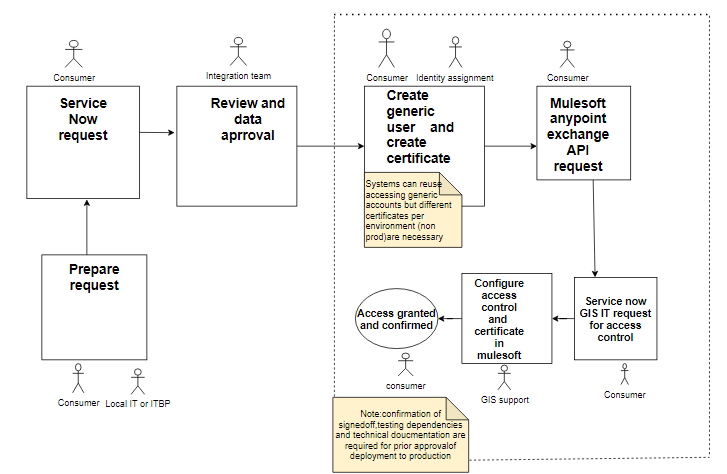
Step 1 - Preparation and ServiceNow Request
- You will need to prepare your request by identifying if you need access to this API or if any other pattern would fit.
- Once the process is reviewed and your data groups are defined, you can submit your request via the “People & Culture Data Access - New request” form
Step 2 - Roche Generic Account and Cloud Certificate
This is the time to create your Roche Generic Account and generate your Roche Cloud Certificate for API authentication purpose. Please follow the 2 steps below:
- Create your Roche generic account (link to the process)
- Generate a cloud certificate from your generic account, please follow the instructions from this article (link to the process)
Please note that we are asking for 2 different generic accounts and certificates: one for NON-PROD environments (DEV, TEST) and one for PROD environments (STAGE, PROD). If you already have generic accounts and certificates from previous projects, you can reuse them (as far as you have 2 different ones: one for NON-PROD and one for PROD).
Additional note:__\_________ we are asking to start this process before submitting your request in Anypoint Exchange as this is a separated process driven by identity management. This request can take some time, starting it early emough can help speeding up the process._
Step 3 - Mulesoft Access request (requires step 1 to be completed) - Please read carefully each of the points listed below
Please follow the steps below to submit your request in Anypoint Exchange:
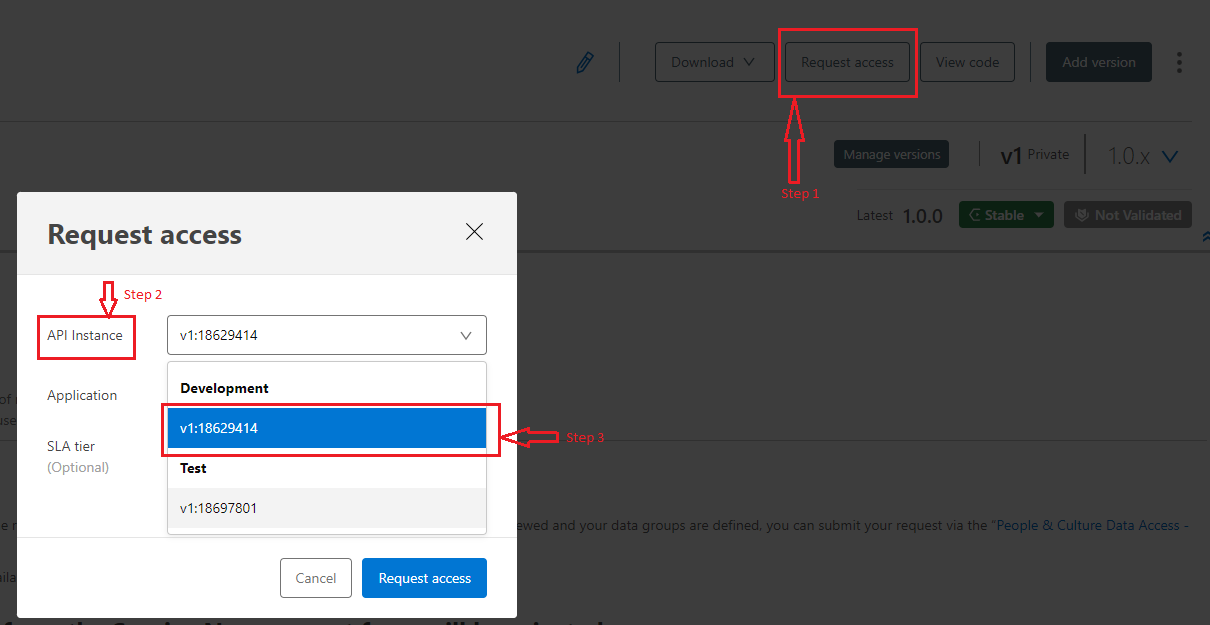
- In the top right hand corner of this page click to "Request access"
- Select the desired environment to connect (DEV, TEST or PROD - a specific agreement with the FGH team will be required for access to the STAGE environment).
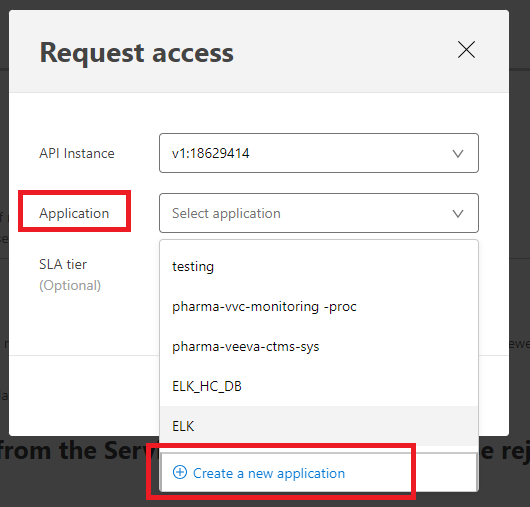
- Select "Select application" and choose to "Create a new application". Important notice: we will be asking you to create 2 specific applications - one for non-prod environments (DEV, TEST) and one for PRE-PROD and PROD environments (STAGE and PROD). Example: fgh-workday-non-prod, fgh-workday-prod. Please follow this naming convention: "{department short code}-{application name}-{environment (NON-PROD or PROD)}"
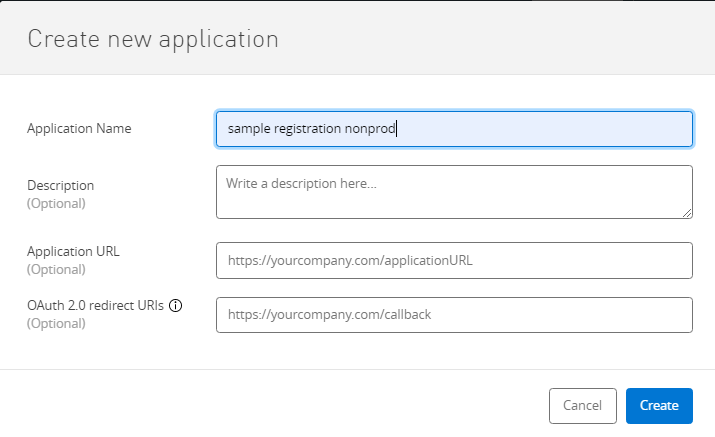
- Enter details for your consuming application. The more information provided here, the easier the API Owner will be able to approve your request. Once completed click "Create".
- Select the desired "SLA Tier"
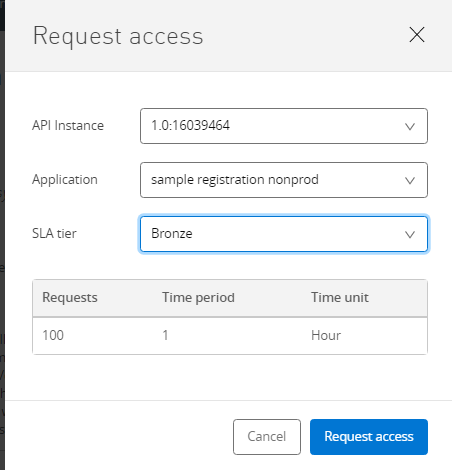
- A confirmation pop up will be shown informing you that the request has been made. A confirmation email will be sent containing your clientid once the request has been approved.
Note:__\_______ All requests that did not start from the Service Now request form (from step 1) will be rejected._
Step 4 - ServiceNow Request to GIS Operations Team
- The request will be reviewed by the GIS Operations Team and approved.
- On approval , clientID and clientSecret will be given.
- These credentials can also be accessed on my Applications page.
Additional questions can be sent to gis_it.mulesoft_operations@roche.com.
Additional note: Once the request is submitted, a change of the configuration file of pharma-inspectnlot-labware-sys application will be made in order to configure your access to data groups and countries. A redeployment of this api will also be done by GIS Operations Team to activate your access. Additionally, the GIS Operation Team will configure SSL Policy in API Manager to map your Mulesoft Application client app’s client id with Serial Number of certificate. Once done the GIS Operation team will send you a confirmation.
How do I connect to Dev?
Endpoints URLs:
Other endpoints:
- https://dev-de-c1.apis.roche.com/pharma-veeva-ctms-sys-dev/v1/query
- https://dev-de-c1.apis.roche.com/pharma-veeva-ctms-sys-dev/v1/query/{paginationUrl}
- https://dev-de-c1.apis.roche.com/pharma-veeva-ctms-sys-dev/v1/configuration/{component_type}
- https://dev-de-c1.apis.roche.com/pharma-veeva-ctms-sys-dev/v1/vobjects/{object_name}
- https://dev-de-c1.apis.roche.com/pharma-veeva-ctms-sys-dev/v1/vobjects/{object_name}
- https://dev-de-c1.apis.roche.com/pharma-veeva-ctms-sys-dev/v1/vobjects/{object_name}/{object_record_id}
- https://dev-de-c1.apis.roche.com/pharma-veeva-ctms-sys-dev/v1/vobjects/{object_name}/{object_record_id}/attachments
- https://dev-de-c1.apis.roche.com/pharma-veeva-ctms-sys-dev/v1/vobjects/{object_name}/{object_record_id}/attachments
- https://dev-de-c1.apis.roche.com/pharma-veeva-ctms-sys-dev/v1/vobjects/{object_name}/{object_record_id}/actions/{action_name}
- https://dev-de-c1.apis.roche.com/pharma-veeva-ctms-sys-dev/v1/objects/picklists/{picklist_name}
- https://dev-de-c1.apis.roche.com/pharma-veeva-ctms-sys-dev/v1/services/loader/load
- https://dev-de-c1.apis.roche.com/pharma-veeva-ctms-sys-dev/v1/services/loader/{job_id}/tasks/{task_id}/results
- https://dev-de-c1.apis.roche.com/pharma-veeva-ctms-sys-dev/v1/services/loader/{job_id}/tasks/{task_id}/results/renditions
- https://dev-de-c1.apis.roche.com/pharma-veeva-ctms-sys-dev/v1/auth
- https://dev-de-c1.apis.roche.com/pharma-veeva-ctms-sys-dev/v1/auth/oauth/session/{oath_oidc_profile_id}
Note: only v1 is available so far. Take [version] as v1.
When making a request the client id and client secret must be provided as part of basic authentication & in the header parameters:
- client_id
- client_secret
The Client SSL certificate must also be provided.
How do I connect to Test?
Endpoints URLs:
Other endpoints:
- https://test-de-c1.apis.roche.com/pharma-veeva-ctms-sys-test/v1/query
- https://test-de-c1.apis.roche.com/pharma-veeva-ctms-sys-test/v1/query/{paginationUrl}
- https://test-de-c1.apis.roche.com/pharma-veeva-ctms-sys-test/v1/configuration/{component_type}
- https://test-de-c1.apis.roche.com/pharma-veeva-ctms-sys-test/v1/vobjects/{object_name}
- https://test-de-c1.apis.roche.com/pharma-veeva-ctms-sys-test/v1/vobjects/{object_name}
- https://test-de-c1.apis.roche.com/pharma-veeva-ctms-sys-test/v1/vobjects/{object_name}/{object_record_id}
- https://test-de-c1.apis.roche.com/pharma-veeva-ctms-sys-test/v1/vobjects/{object_name}/{object_record_id}/attachments
- https://test-de-c1.apis.roche.com/pharma-veeva-ctms-sys-test/v1/vobjects/{object_name}/{object_record_id}/attachments
- https://test-de-c1.apis.roche.com/pharma-veeva-ctms-sys-test/v1/vobjects/{object_name}/{object_record_id}/actions/{action_name}
- https://test-de-c1.apis.roche.com/pharma-veeva-ctms-sys-test/v1/objects/picklists/{picklist_name}
- https://test-de-c1.apis.roche.com/pharma-veeva-ctms-sys-test/v1/services/loader/load
- https://test-de-c1.apis.roche.com/pharma-veeva-ctms-sys-test/v1/services/loader/{job_id}/tasks/{task_id}/results
- https://test-de-c1.apis.roche.com/pharma-veeva-ctms-sys-test/v1/services/loader/{job_id}/tasks/{task_id}/results/renditions
- https://test-de-c1.apis.roche.com/pharma-veeva-ctms-sys-test/v1/auth
- https://test-de-c1.apis.roche.com/pharma-veeva-ctms-sys-test/v1/auth/oauth/session/{oath_oidc_profile_id}
Note: only v1 is available so far. Take [version] as v1.
When making a request the client id and client secret must be provided as part of basic authentication & in the header parameters:
- client_id
- client_secret
The Client SSL certificate must also be provided.
How do I connect to Stage?
Endpoints URLs: Need To Be Verified
Other endpoints:
- https://stage-de-c1.apis.roche.com/pharma-veeva-ctms-sys-stage/v1/query
- https://stage-de-c1.apis.roche.com/pharma-veeva-ctms-sys-stage/v1/query/{paginationUrl}
- https://stage-de-c1.apis.roche.com/pharma-veeva-ctms-sys-stage/v1/configuration/{component_type}
- https://stage-de-c1.apis.roche.com/pharma-veeva-ctms-sys-stage/v1/vobjects/{object_name}
- https://stage-de-c1.apis.roche.com/pharma-veeva-ctms-sys-stage/v1/vobjects/{object_name}
- https://stage-de-c1.apis.roche.com/pharma-veeva-ctms-sys-stage/v1/vobjects/{object_name}/{object_record_id}
- https://stage-de-c1.apis.roche.com/pharma-veeva-ctms-sys-stage/v1/vobjects/{object_name}/{object_record_id}/attachments
- https://stage-de-c1.apis.roche.com/pharma-veeva-ctms-sys-stage/v1/vobjects/{object_name}/{object_record_id}/attachments
- https://stage-de-c1.apis.roche.com/pharma-veeva-ctms-sys-stage/v1/vobjects/{object_name}/{object_record_id}/actions/{action_name}
- https://stage-de-c1.apis.roche.com/pharma-veeva-ctms-sys-stage/v1/objects/picklists/{picklist_name}
- https://stage-de-c1.apis.roche.com/pharma-veeva-ctms-sys-stage/v1/services/loader/load
- https://stage-de-c1.apis.roche.com/pharma-veeva-ctms-sys-stage/v1/services/loader/{job_id}/tasks/{task_id}/results
- https://stage-de-c1.apis.roche.com/pharma-veeva-ctms-sys-stage/v1/services/loader/{job_id}/tasks/{task_id}/results/renditions
- https://stage-de-c1.apis.roche.com/pharma-veeva-ctms-sys-stage/v1/auth
- https://stage-de-c1.apis.roche.com/pharma-veeva-ctms-sys-stage/v1/auth/oauth/session/{oath_oidc_profile_id}
How do I connect to Production?
Endpoints URLs: Need To Be Verified
Other endpoints:
- https://prod-de-c1.apis.roche.com/pharma-veeva-ctms-sys/v1/query
- https://prod-de-c1.apis.roche.com/pharma-veeva-ctms-sys/v1/query/{paginationUrl}
- https://prod-de-c1.apis.roche.com/pharma-veeva-ctms-sys/v1/configuration/{component_type}
- https://prod-de-c1.apis.roche.com/pharma-veeva-ctms-sys/v1/vobjects/{object_name}
- https://prod-de-c1.apis.roche.com/pharma-veeva-ctms-sys/v1/vobjects/{object_name}
- https://prod-de-c1.apis.roche.com/pharma-veeva-ctms-sys/v1/vobjects/{object_name}/{object_record_id}
- https://prod-de-c1.apis.roche.com/pharma-veeva-ctms-sys/v1/vobjects/{object_name}/{object_record_id}/attachments
- https://prod-de-c1.apis.roche.com/pharma-veeva-ctms-sys/v1/vobjects/{object_name}/{object_record_id}/attachments
- https://prod-de-c1.apis.roche.com/pharma-veeva-ctms-sys/v1/vobjects/{object_name}/{object_record_id}/actions/{action_name}
- https://prod-de-c1.apis.roche.com/pharma-veeva-ctms-sys/v1/objects/picklists/{picklist_name}
- https://prod-de-c1.apis.roche.com/pharma-veeva-ctms-sys/v1/services/loader/load
- https://prod-de-c1.apis.roche.com/pharma-veeva-ctms-sys/v1/services/loader/{job_id}/tasks/{task_id}/results
- https://prod-de-c1.apis.roche.com/pharma-veeva-ctms-sys/v1/services/loader/{job_id}/tasks/{task_id}/results/renditions
- https://prod-de-c1.apis.roche.com/pharma-veeva-ctms-sys/v1/auth
- https://prod-de-c1.apis.roche.com/pharma-veeva-ctms-sys/v1/auth/oauth/session/{oath_oidc_profile_id}
Note: only v1 is available so far. Take [version] as v1.
When making a request the client id and client secret must be provided as part of basic authentication & in the header parameters:
- client_id
- client_secret
The Client SSL certificate must also be provided.
How do I report bugs or production incidents?
Incidents can be raised through the ServiceNow end user portal:
Subject/Description : Simplifi MuleSoft - (Query/Issue)
How do I request for more information?
A request should be raised in Service Now for any technical information or change/update deployment configuration. These requests are sent to the MuleSoft support team.
Please find the steps to complete this here: https://roche.service-now.com/rose?id=sc_cat_item&sys_id=d5293f9a1bc19d18975c99baab4bcbb2&referrer=recent_items
How do I request for new features?
New API project feature(s) or API project change request (not deployment related) should be raised by creating a new demand. This demand will be sent to GIS ICC where engagement will begin.
Please find the steps to complete this here: https://sites.google.com/roche.com/gis-icc/contact-us
Contacts
| Role | Name | Description | Contact |
|---|---|---|---|
| API Owner | Frederic Brisinger | The API Owner is the primary person who is responsible for prioritizing the feature backlog as well as determining if approval can be granted to any new consumer. The API Owner is accountable for the SLAs, Exchange content detail and accuracy of their API in Mulesoft Exchange. API Owner also is the one who can onboard consumers. The API Owner should be contacted if formal channels of intake such as Workday,ServiceNow is not yielding timely results | frederic.brisinger@roche.com |
| API Architect | Wojciech Kucia | API Architect is the primary person responsible for the API’s Architecture and Design. Other Solution Architects and Solution Engineers who are looking forward to reusing this asset may reach out to API Architect address any technical questions they have in case the documentation of each of the end points published in exchange via RAML is not self explanatory. | wojciech.kucia@roche.com |