Access Solutions Enrollment Experience UAPI
Support
How do I request access?
Overview
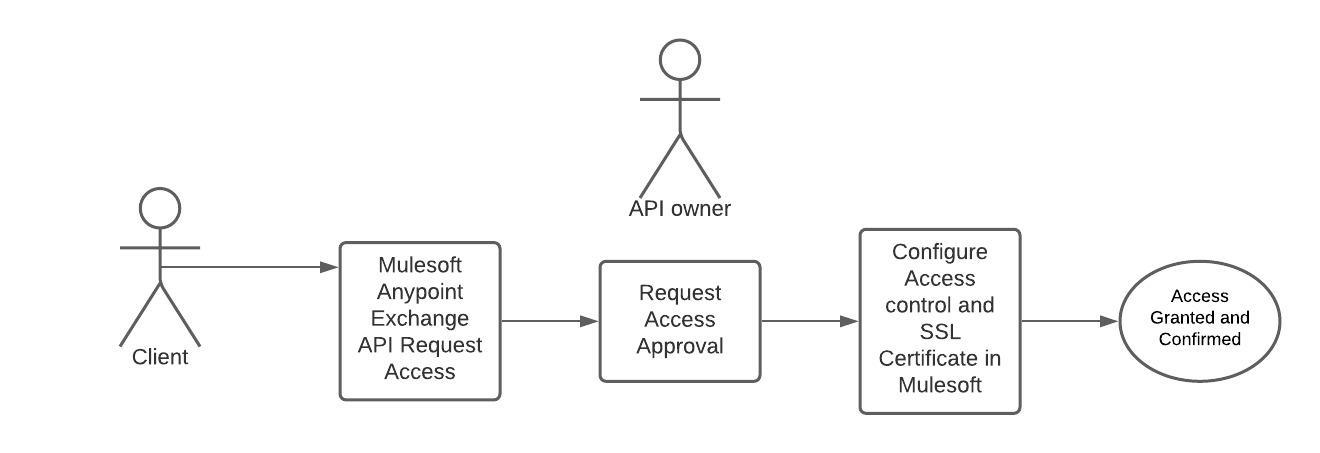
Step 1 - Mulesoft Access request - Please read carefully each of the points listed below
Please follow the steps below to submit your request in Anypoint Exchange: TESTING
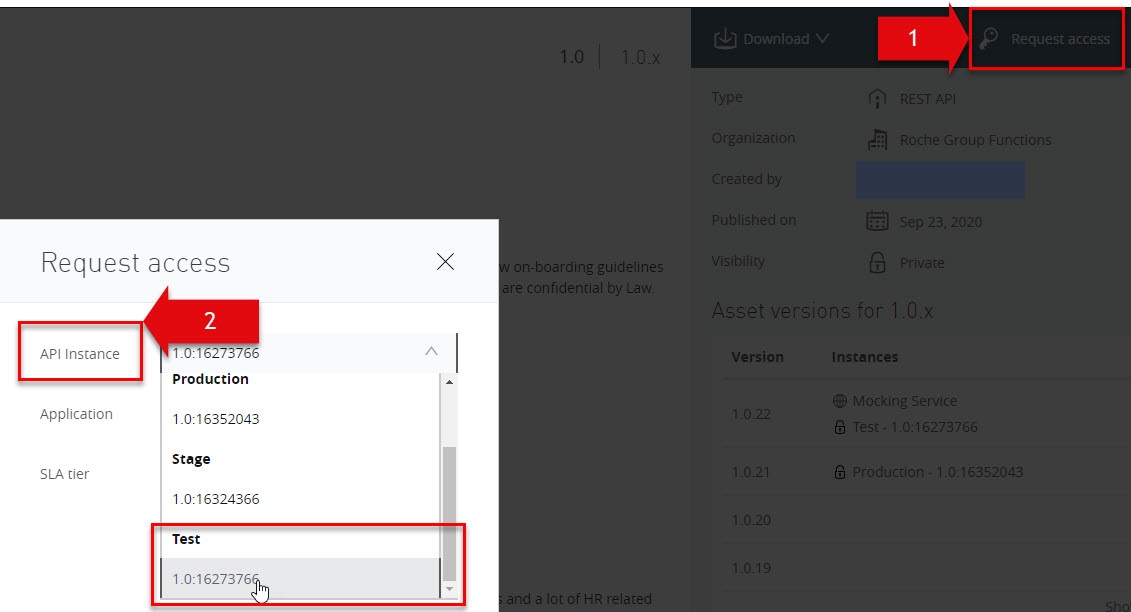
- In the top right hand corner of this page click to "Request access"
- Select the desired environment to connect (DEV, TEST or PROD - a specific agreement with the FGH team will be required for access to the STAGE environment).
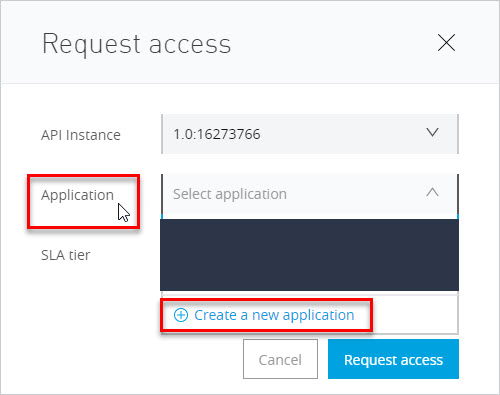
- Select "Select application" and choose to "Create a new application". Important notice: we will be asking you to create 2 specific applications - one for non-prod environments (DEV, TEST) and one for PRE-PROD and PROD environments (STAGE and PROD). Example: fgh-workday-non-prod, fgh-workday-prod. Please follow this naming convention: "{department short code}-{application name}-{environment (NON-PROD or PROD)}"
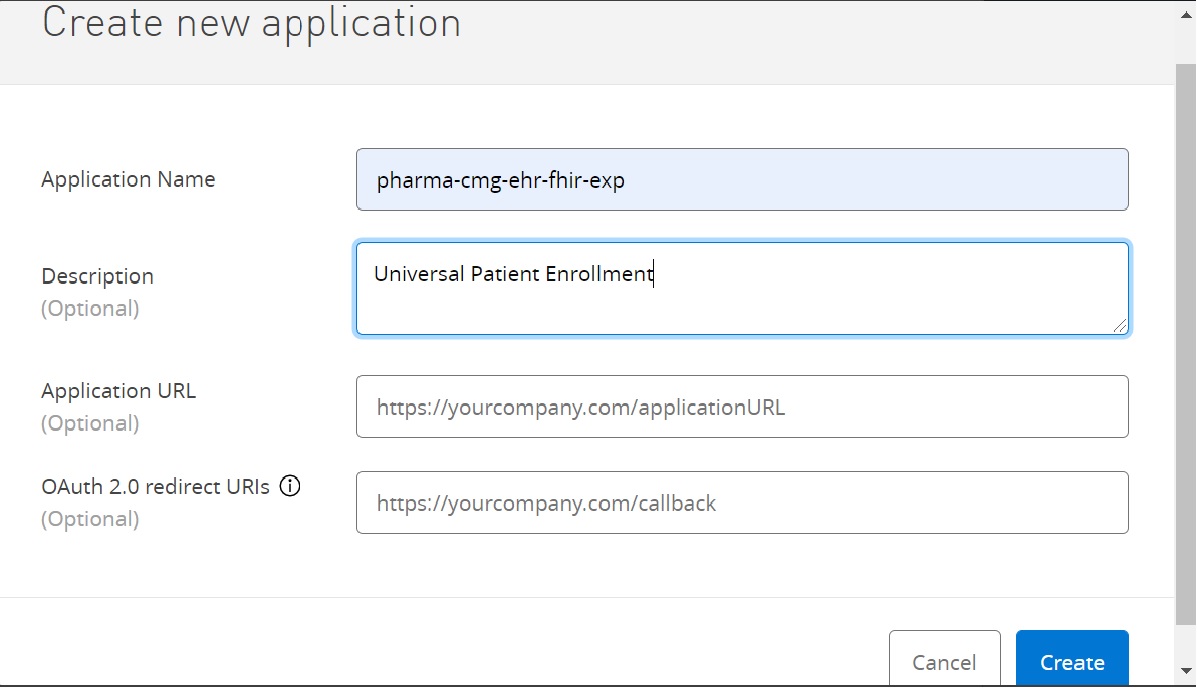
- Enter details for your consuming application. The more information provided here, the easier the API Owner will be able to approve your request. Once completed click "Create".
- Select the desired "SLA Tier"
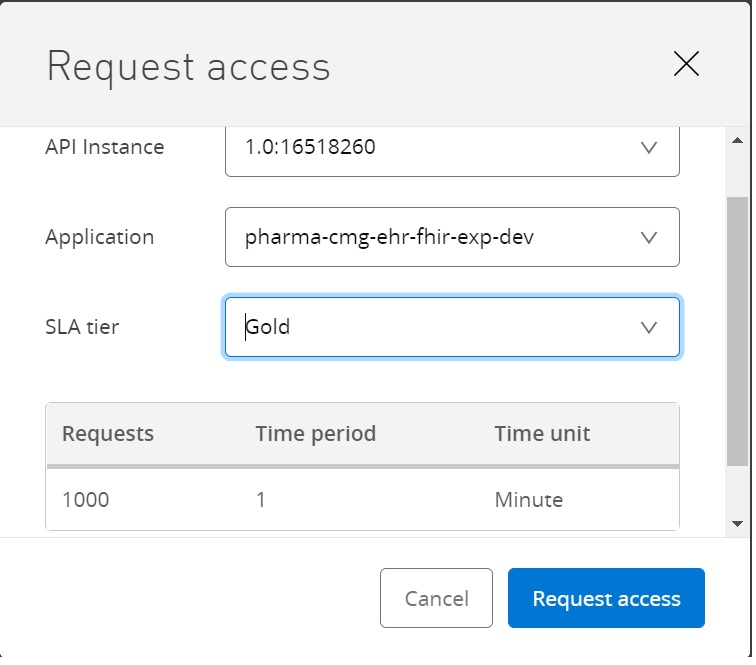
- A confirmation pop up will be shown informing you that the request has been made. A confirmation email will be sent containing your clientid once the request has been approved.
Step 2 - Prepare and submit your SSL Client Certification
After submitting your Anypoint Exchange request (from Step 3), please send an email to the GIS team attaching:
- Your The Mulesoft application name (from Step 1)
- SSL Client Certification Serial number.
View how to find the SSL Certificate Serial Number here
How do I connect to Test?
Endpoints URLs:
- https://test-us-e1.apis.roche.com/pharma-cmg-ehr-fhir-exp-dev/[version]/enrollment
- https://test-us-e1.apis.roche.com/pharma-cmg-ehr-fhir-exp-dev/[version]/patient_consent
- https://test-us-e1.apis.roche.com/pharma-cmg-ehr-fhir-exp-dev/[version]/icd10
- https://test-us-e1.apis.roche.com/pharma-cmg-ehr-fhir-exp-dev/[version]/payer
- https://test-us-e1.apis.roche.com/pharma-cmg-ehr-fhir-exp-dev/[version]/status
Note: Version 1 and version 2 are available. For [version] you can use v2.
When making a request the client id and client secret must be provided as part of basic authentication & in the header parameters:
- client_id
- client_secret
The Client SSL certificate must also be provided.
How do I connect to Production?
Endpoints URLs:
- https://prod-us-e1.apis.roche.com/pharma-cmg-ehr-fhir-exp/[version]/enrollment
- https://prod-us-e1.apis.roche.com/pharma-cmg-ehr-fhir-exp/[version]/patient_consent
- https://prod-us-e1.apis.roche.com/pharma-cmg-ehr-fhir-exp/[version]/icd10
- https://prod-us-e1.apis.roche.com/pharma-cmg-ehr-fhir-exp/[version]/payer
- https://prod-us-e1.apis.roche.com/pharma-cmg-ehr-fhir-exp/[version]/status
Note: Version 1 and version 2 are available. For [version] you can use v2.
When making a request the client id and client secret must be provided as part of basic authentication & in the header parameters:
- client_id
- client_secret
The Client SSL certificate must also be provided.
How do I report bugs or production incidents?
Incidents can be raised through ServiceNow end user portal:
Prod: https://roche.service-now.com/service_portal?id=sc_cat_item_id=6547856adbaf845cbd13f687f496194f
Non-Prod: https://roche.service-now.com/service_portal?id=sc_cat_item_id=df701d6adb27c45cbd13f687f49619e9
You can also do it via the ServiceNow backend portal and assign the incident to GIS operations service and group:
- Service: GIS API Delivery Service
- Assignment group: GIS MuleSoft Support Team
Please find the steps to complete this here: https://rochewiki.roche.com/confluence/display/APIGOV/How+to+create+an+Incident
How do I request for more information?
Check out our FAQ page first! If you don’t find the answer in our FAQ or gSite, you can raise any questions via our form “Raise a question”. Please contact the API owner or Architect only in case of escalations.
A request should be raised in Service Now for any technical information or for change/update deployment configuration. These requests are sent to the MuleSoft support team.
Please find the steps to complete this here: https://rochewiki.roche.com/confluence/display/APIGOV/How+to+Create+a+Request
How do I request for new features?
New API project feature(s) or API project change request (not deployment related) should be raised by creating a new demand. This demand will be sent to GIS ICC where engagement will begin.
Please find the steps to complete this here: https://sites.google.com/roche.com/gis-icc/contact-us
Contacts
| Role | Name | Role Description | Contact |
|---|---|---|---|
| API Owner | Vladimir Tsutskhvashvili | The API Owner is the primary person who is responsible for prioritizing the feature backlog as well as determining if approval can be granted to any new consumer. The API Owner is accountable for the SLAs, Exchange content detail and accuracy of their API in Mulesoft Exchange. API Owner also is the one who can onboard consumers. The API Owner should be contacted if formal channels of intake such as Workday,ServiceNow is not yielding timely results | tsutskhv@gene.com |
| API Architect | Venkat Kanneboina | API Architect is the primary person responsible for the API’s Architecture and Design. Other Solution Architects and Solution Engineers who are looking forward to reusing this asset may reach out to API Architect address any technical questions they have in case the documentation of each of the end points published in exchange via RAML is not self explanatory. | venkatk@gene.com, patient-access-dev-mulesoft-d@gene.com |