Inventory API
Inventory API
The Inventory API manages inventory for the consumer system where they can receive, create and update the inventory the ICS account.
Introduction
Inventory API is secured by OAuth token validation, allowing customer to access inventory depending on the API use cases:
- Receive transfer (Create inventory)
- Fetch Inventory details with specific query parameters.
- Create Inventory product lot and waste records.
- Update Inventory records.
Overview
The inventory has below endpoints.
/ping: This endpoint returns API health.
This endpoint consists of GET method, which gives the health status of the API.
/inventory:
This endpoint consists of GET, PUT methods, these are used to fetch, create and update the Inventory.
GET: This method returns inventory details by using below query parameters.
- sourceSystem: It is mandatory parameter used for querying the inventory details.
- sourceSystemPackageId: This is an external (source) package Id used for querying the inventory details.
- icsPackageId: This is the ICS package ID generated by the ICS system. This is an optional field.
- pageNumber: It is an optional field used for querying the inventory details with specific page number.
- fromDate: The date from which inventory to be extracted.
- toDate: The date till which inventory to be extracted.
PUT: This method receive(creates)/updates inventory details in ICS system.
- Using this method, product lot for harvested product can be created.
- API can do the receive transfer which creates inventory packages in receiving facility.
- It can update the existing inventory packages by providing adjustment reasons.
- Waste packages can be created by selecting the recordType as waste.
Key features and benefits
The following are features and benefits of the Inventory API:
- Provides access to account details including token validation
- Puts your customers in control of their data sharing permissions and grants through our Security.
How it works
The following diagram illustrates how the Inventory API works.
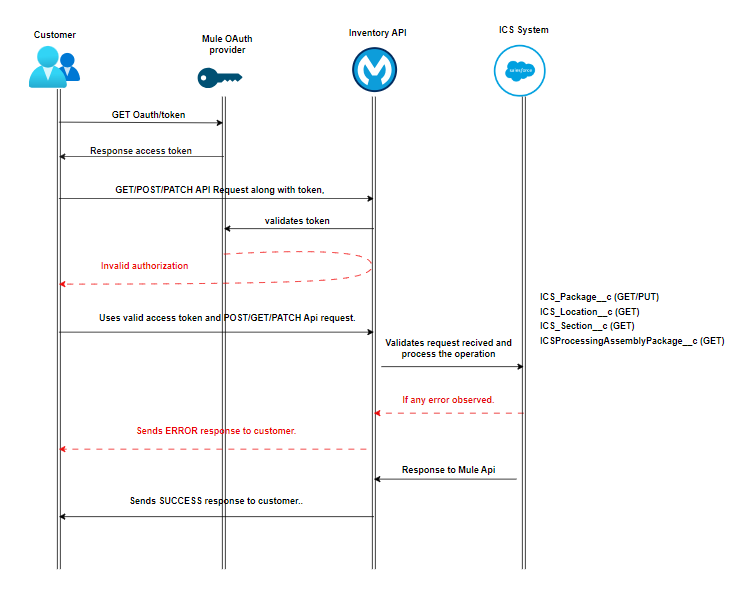
- The customer sends client ID and Secret requesting authorization token to mule oauth provider API.
- Mule API sends the secure token.
- The customer enters their secure token and with valid Json calls inventory API.
- Mule OAuth provider processes the customer credentials and token to determine the authorization.
- If the access is successful, the request is passed from Mule Api to ICS.
- Based on the request, Mule inventory API perform the operations on given records.
- Response received from ICS is returned to the customer in Json format.
- If there is any error in the flow or validation error, Mule API handles and returns the specific error with standard error codes.
Validations
The following are the validations for Inventory API:-
- To fetch packages - sourceSystem is the mandatory queryParam
- To create a new package record in ICS – “sourceSystem and sourceSystemPackageId” need to be sent for the request.
- To update the package record - "Provide either sourceSystemPackageId or icsPakcageId value".
- To split the package record - "Parent package quantity must not be less than or equal to zero".
- New lot creation is limited to cultivators only. Although waste package and split can be performed by other facility types.
- Product category verification is done against the facility type in new package creation scenario.
- In Inventory reconciliation adjustmentReason is mandatory field and if the adjustmentReason value is “Other”, then reconciliation Notes are mandatory. Reconciliation can be performed by all facility types.
- "icsParentPackageId" cannot not be passed to a package reconciliation request.
- While creating harvest lots available harvest weight cannot be less than the requested package quantity and sourceSystemBatchId passed should be valid.
- Location details are validated if passed.
- Validation on strain and product in case invalid strain and product names are passed which are not related to given account.
- In plant package creation total number of plants should match with quantityAvailable provided.
- In case of waste package destruction scenario, destructionReason and destructionDate are mandatory.
In Split package:
- Parent package remaining quantity cannot be less than the package total available quantity.
- adjustmentReason is mandatory.
In Receive transfer:
- icsTransferId is mandatory and should be set to "Out for Delivery" status.
- Flow validation added on get transfer call- transfer response should not be empty.
- sourceSystemBatchId and sourceSystemPackageId are mandatory fields.
- Number of transfer package count should match with the input requests’s array size.
- Transfer package’s should match with the packages provided in the request
Use Cases
The following use cases are supported by the Inventory API.
| Use Case | Endpoint | Method | Description | Required Inputs | Key Validations |
|---|---|---|---|---|---|
| API Health Check | /ping | GET | Verifies API availability and health status. | None | Returns API health status. |
| Retrieve Inventory Details | /inventory | GET | Fetches inventory/package details from ICS using query parameters. | sourceSystem | sourceSystem is mandatory. Optional filters include sourceSystemPackageId, icsPackageId, pageNumber, fromDate, and toDate. |
| Receive Transfer Inventory | /inventory | PUT | Receives transferred inventory and creates package records in ICS. | icsTransferId, sourceSystem, sourceSystemPackageId, sourceSystemBatchId | Transfer must exist and be in Out for Delivery status. Package count and transferred package details must match the request. |
| Create Inventory Package | /inventory | PUT | Creates a new inventory/package record in ICS. | sourceSystem, sourceSystemPackageId | Both fields are mandatory. Product category must match facility type. Location, product, and strain validations apply. |
| Update Inventory Package | /inventory | PUT | Updates an existing inventory/package record. | sourceSystem,sourceSystemPackageId or icsPackageId | At least one identifier must be provided. |
| Create Harvest Lot | /inventory | PUT | Creates a harvest/product lot package in ICS. | sourceSystem,sourceSystemBatchId, quantityAvailable and sourceSystemBatchId | Available harvest weight must be sufficient and batch ID must be valid. |
| Create Waste Package | /inventory | PUT | Creates waste package records and supports package destruction. | Waste package details | destructionReason and destructionDate are mandatory for destruction scenarios along with package details |
| Split Inventory Package | /inventory | PUT | Splits an existing package into child packages. | Parent package details, split quantity, adjustmentReason | Parent quantity must be greater than zero. Remaining quantity must be valid. adjustmentReason is mandatory. |
| Inventory Reconciliation | /inventory | PUT | Performs inventory adjustments and reconciliation activities. | adjustmentReason | adjustmentReason is required. When value is Other, reconciliation notes are mandatory. icsParentPackageId cannot be supplied. |
| Create Plant Package | /inventory | PUT | Creates plant inventory packages. | Plant package information | sourceSystemPlantIds Number of plants must match quantityAvailable. |