Purchase Order API
Purchase Order API
This API is use for creation of purchase orders. The consumer who is purchasing items from producer can keep track of their purchases in ICS System using this API. Pharmacy can also use this API to accept returns from patients which updates the patient purchase limits.
Introduction
The Purchase Order API allows to create and get the details from ICS account. It is secured by OAuth token, allowing customer to access any or all of the order data for specific facility depending on the API use case:
- Fetch all Purchase Order details.
- Fetch Purchase Order details with specific query parameters.
- Create Purchase Order.
Overview
The Purchase Order API is a REST-based service that provides secure and efficient access to purchase order information, enabling consumers to create and retrieve order data from the ICS platform. The API exposes the following endpoints.:
/ping:
This endpoint consists of GET method, which provides the health status of the API.
/purchaseOrders:
This endpoint consists of GET, PUT methods, these are used to fetch, create the Purchase Orders.
GET: This method returns purchaseOrder details by using below query parameters.
- sourceSystem: It is mandatory parameter used for querying the PO details.
- sourceSystempurchaseOrderId: This is an external (source) PO Ids used for querying the order details.
- icspurchaseOrderId: This is the ICS purchase order id (name) generated by the ICS system. This is an optional field.
- pageNumber: It is an optional field used for querying the PO details with specific page number.
- fromDate: use this field to extract PO from specific date until today if toDate param is not passed.
- toDate: use this field to extract PO till specific date from specific date. If fromDate is not present then it will exract all records until current date.
PUT: This method creates purchaseOrder details in ICS system.
- Purchase order can be created for B2B when partnerFacility value is passed in request.
- API allows order with icsPackageId only for all transactions.
- Purchase order for B2C i.e. return from patient is created when patientNumber or caregiverNumber is passed in the request by pharmacy.
Key features and benefits
The following are features and benefits of the Purchase Order API:
- Access is controlled through specific client id and source system codes.
- Puts customers in control of their data sharing permissions and grants through API Security.
- Data validation while modifying orders.
- No PII or secure information is logged during transaction.
How it works
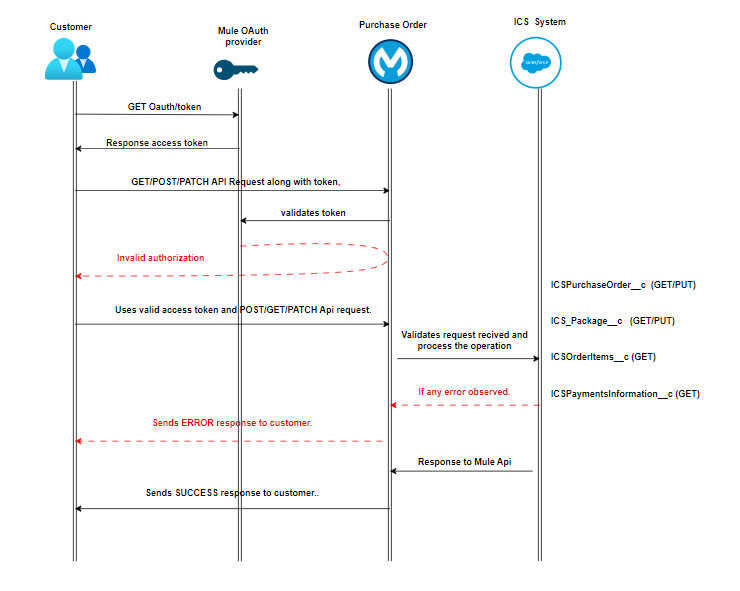
The following diagram illustrates how the Purchase Order API works.
- The customer sends client ID and Secret requesting authorization token from Mule OAuth provider API.
- Send the security token and client id in header with valid JSON request to Purchase Order endpoint.
- If the access is successful, API will perform the operations and create/get the records to/from ICS.
- Response from ICS is captured and return to source system.
- If any error in the flow or validation error, Mule API handles and reverts the specific error with the customer along with standard error codes.
Validations
The following are the validations for data transformation in Purchase Orders API.
- sourceSystem, sourceSystemPurchaseOrderId, icsSalesOrderId and order items are required to create purchase order records.
- icsPackageId under order items are required for B2B and B2C scenarios
- For B2B, API verifies the transfer created against the sales order before creating the purchase order.
- For B2B, once purchase order is created, it automatically approves the transfer and sales order.
- For B2C, if patientNumber or caregiverNumber is available in request, API treats it as Pharmacy order returns.
- For Pharmacy, returns will be allowed with partial quantities of packages and patient purchase history will be adjusted.
- For B2C, returned quantities will be adjusted to original package associated with transaction.
- Pharmacy can create refund record using purchase order by not passing orderItems in the request. Refund does not adjust patient history.
- Purchase order updates are restricted.
Use cases
The Purchase Order API supports data access for the following use cases.
| Use Case | Endpoint | Method | Description | Required Inputs | Key Validations |
|---|---|---|---|---|---|
| API Health Check | /ping | GET | Verifies API availability and health status. | None | Returns API health status response. |
| Retrieve All Purchase Orders | /purchaseOrders | GET | Retrieves Purchase Order records from ICS. | sourceSystem | sourceSystem is mandatory for querying Purchase Orders. |
| Retrieve Purchase Order by Source System ID | /purchaseOrders | GET | Fetches a Purchase Order using the external source order identifier. | sourceSystem, sourceSystemPurchaseOrderId | Source system purchase identifier must be valid and associated with the requesting source system. |
| Retrieve Purchase Order by ICS Purchase Order ID | /purchaseOrders | GET | Retrieves a specific Purchase Order using the ICS-generated identifier. | icsPurchaseOrderId | Valid ICS Purchase Order ID must be provided. |
| Retrieve Purchase Orders by Date Range | /purchaseOrders | GET | Retrieves Purchase Orders created within a specified date range. | fromDate, toDate (optional) | Date filters can be used to extract high-volume Purchase Order data. |
| Create B2B Purchase Order | /purchaseOrders | PUT | Creates a Purchase Order for facility-to-facility transactions against an existing Sales Order. | sourceSystem, sourceSystemPurchaseOrderId, icsSalesOrderId, orderItems | Transfer validation is performed against the related Sales Order before Purchase Order creation. |
| Create Pharmacy Return Purchase Order (B2C) | /purchaseOrders | PUT | Processes product returns from patients or caregivers. | patientNumber or caregiverNumber, orderItems | API identifies the transaction as a return and adjusts patient purchase history. |
| Create Pharmacy Refund Purchase Order (B2C) | /purchaseOrders | PUT | Processes payment refund from patients or caregivers. | patientNumber or caregiverNumber | No orderItems and optional paymentsInfo. No purchase history adjusted for refund |
| Update Purchase Order Restricted | /purchaseOrders | PUT | updates not allowed for Purchase Order in ICS. | Existing Purchase Order identifier | No Updates are allowed on Purchase Order. |
| Approve Sales Order and Transfer via Purchase Order | /purchaseOrders | PUT | Automatically approves related Sales Orders and Transfers through Purchase Order creation. | Valid Purchase Order request linked to Sales Order | Applicable to B2B workflows only. |