Transfer API
Transfer API
This API is used in transferring packages from producer to partner in labs, Orders.
Introduction
The Transfer API allows to fetch/initiate details from ICS account. Transfer API is secured by OAuth token validation, allowing customer to access any or all of the following depending on the API use case:
- Fetch all Transfer details.
- Fetch Transfer details with specific query parameters.
- Create/Update Lab Transfer.
- Create/Update Sales Order Transfer.
Overview
The Transfer API is a REST-based solution that deals secure and convenient customer and business access to transfer data. It provides information about the Lab/Sales/Purchase Transfer details from the ICS.
It has below endpoints,
/ping: This endpoint returns API health, it returns the health status of the API.
/transfers: This endpoint consists of GET, PUT methods, these are used to fetch, create and update the transfers.
- When the lab details are passed from the request it retrieves/initiate Lab transfer details
- When the Sales Order number is passed from the request it retrieves Sales transfer details.
- when the Purchase Order number is passed from the request it retrieves Purchase transfer details.
GET : This method returns transfer details by using below query parameters.
- partnerFacility: It is a optional field used for querying the transfer details.
- sourceSystem: It is optional parameter (sourceSystem can be passed along with combination of sourceSystemTransferId) used for querying the transfer details.
- sourceSystemTransferId: This is an external (source) transfer Ids used for querying the transfer details.
- icsTransferId: This is the ICS transfer ID generated by the ICS system. This is an optional field.
- status: It is an optional field used for querying the transfer details for all stages.
- pageNumber: It is an optional field used for querying the transfer details with specific page number.
PUT : This method creates/updates transfer details in ICS system. While creating transfer records below are the validation performed.
- The sourceSystem,partnerFacility,driverLicense,licensePlate,packages and required parameters need to be passed to create transfer.
- The required fields to be passed for respective transfers. for instance: icsSalesOrderId need to be passed while creating a salesOrder transfer.
- The details of specific record can also be modified/updated by using same method,user need to pass sourceSystemTransferId of particular record.
Key features and benefits
- Provides access to account details including token validation and initiates/retrieves for a variety of transfer types.
- Puts your customers in control of their data sharing permissions and grants through our Security.
- Validate data and access before performing transaction
How it works
The following diagram illustrates how the Transfer API works.
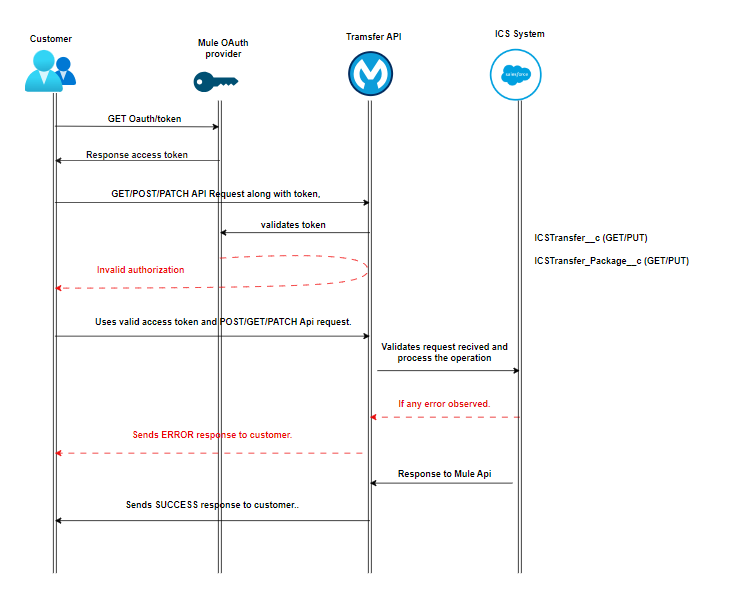
- The customer sends client ID and Secret requesting authorization token to access Mule APi.
- Mule API sends the secure token.
- The customer enters their secure token and valid Json request for specific transfer type.
- Mule OAuth provider processes the customer credentials and token to determine the authorization.
- If the access is successful, the request is passed from Mule Api to ICS.
- Response received from ICS is captured.
- Mule API send the response back the customer in Json format.
- If any error in the flow or validation error, Mule API handles and reverts the specific error with the customer along with standard error codes.
Validations
The following are the validations for data transformation in Transfer API.
- sourceSystem is passed along with sourceSystemTransferId in creation or update of the Transfer record.
- Update of a transfer record cannot be performed when the status of the transfer is “Out for Delivery” or "Approved" or is finalized.
- Receive transfer is only possible with the transfer status is in “Out for Delivery” and finalTranfer flag is “True”.
- (B2B) Allow the transfer if reserve quantity of package matches with the sales order quantity (order Item requested quantity) else if SO is created with product then order item quantity and packageSize is validated against package available quantity.
- For B2B transfers, remaining quantity for each package is validated to be zero to ensure complete package transfer. Partial package transfers are restricted.
- For B2B transfers order item Ids provided in the input request should match with SO order item Ids.
- For B2C transfers, packages provided in input request should match with SO OI packages.
- For B2C transfers, OI quantity is validated to be less than or equal to package reserve quantity. Partial package transfers are allowed in case of patient transfers.
- Partner can see the "Ready for Review" and "Out for Delivery" transfers using GET call.
- Transfer cannot be created if orderFulfilmentMethod value for provided SalesOrder is not Delivery.
- icsSalesOrderId field is mandatory for transfer creation except if partner Facility is Lab.
- (B2B) Validation is added to check whether partner has created a PO against the SO, before setting transfer to “Out for Delivery”. Exception:-When the partner facility is “Lab” or it is patient transfer.
- Validation error is raised if input packages provided do not exists in the ICS.
- (B2B) icsOrderItemIds passed are validated against sales order icsOrderItemIds. Validation error thrown if no icsOrderItemIds passed or incorrect icsOrderItemIds passed. Exception: Patient transfers.
- Error is raised if test results are not passed in case partner facility if Pharmacy or it’s a patient transfer. Test result validation is bypassed for cultivator-processor transfers.
- Valid driver and vehicle details are required in case of WholeSale and Internal transfers and for Retail Transfers either driver or courierName is mandatory.
- If vehicle information is not provided in the input, it will be extracted from driver information.
Use cases
The following use cases are supported by the Transfer API.
| Use Case | Endpoint | Method | Description | Required Inputs | Key Validations |
|---|---|---|---|---|---|
| API Health Check | /ping | GET | Verifies API availability and health status. | None | Returns API health status. |
| Retrieve Transfer by Source facility | /transfers | GET | Fetches transfer details using source system identifiers. | sourceSystem, sourceSystemTransferId | Source system identifiers must correspond to an existing transfer. Supports filtering through optional query parameters. |
| Retrieve Transfers by Partner Facility | /transfers | GET | Retrieves transfers associated with a specific partner facility. | partnerFacility | Transfer must be in Ready for Review status. |
| Create Lab Transfer | /transfers | PUT | Creates a transfer to a testing laboratory. | sourceSystem, partnerFacility, package details, driver/vehicle information | Lab-specific transfer details must be provided. Sales Order is not mandatory for Lab transfers. |
| Create Sales Order Transfer (B2B) | /transfers | PUT | Creates a transfer associated with a Sales Order between facilities. | icsSalesOrderId, package details, partner facility | Sales Order must exist. Reserved package quantity must match Sales Order quantity. |
| Create Patient Transfer (B2C) | /transfers | PUT | Creates a transfer associated with patient sales. | icsSalesOrderId, patientNumber or caregiverNumber and package details | Package quantity must be less than or equal to reserved quantity. Partial transfers are allowed. |
| Update Transfer Details | /transfers | PUT | Updates an existing transfer record. | sourceSystemTransferId | Transfers cannot be updated when status is Approved, Out for Delivery, or finalized. |
| Set Transfer to Out for Delivery | /transfers | PUT | Updates transfer status for shipment. | Transfer details, valid order references | For B2B transfers, partner Purchase Order validation is required before status update. For B2C transfer, purchase order is not required. |